


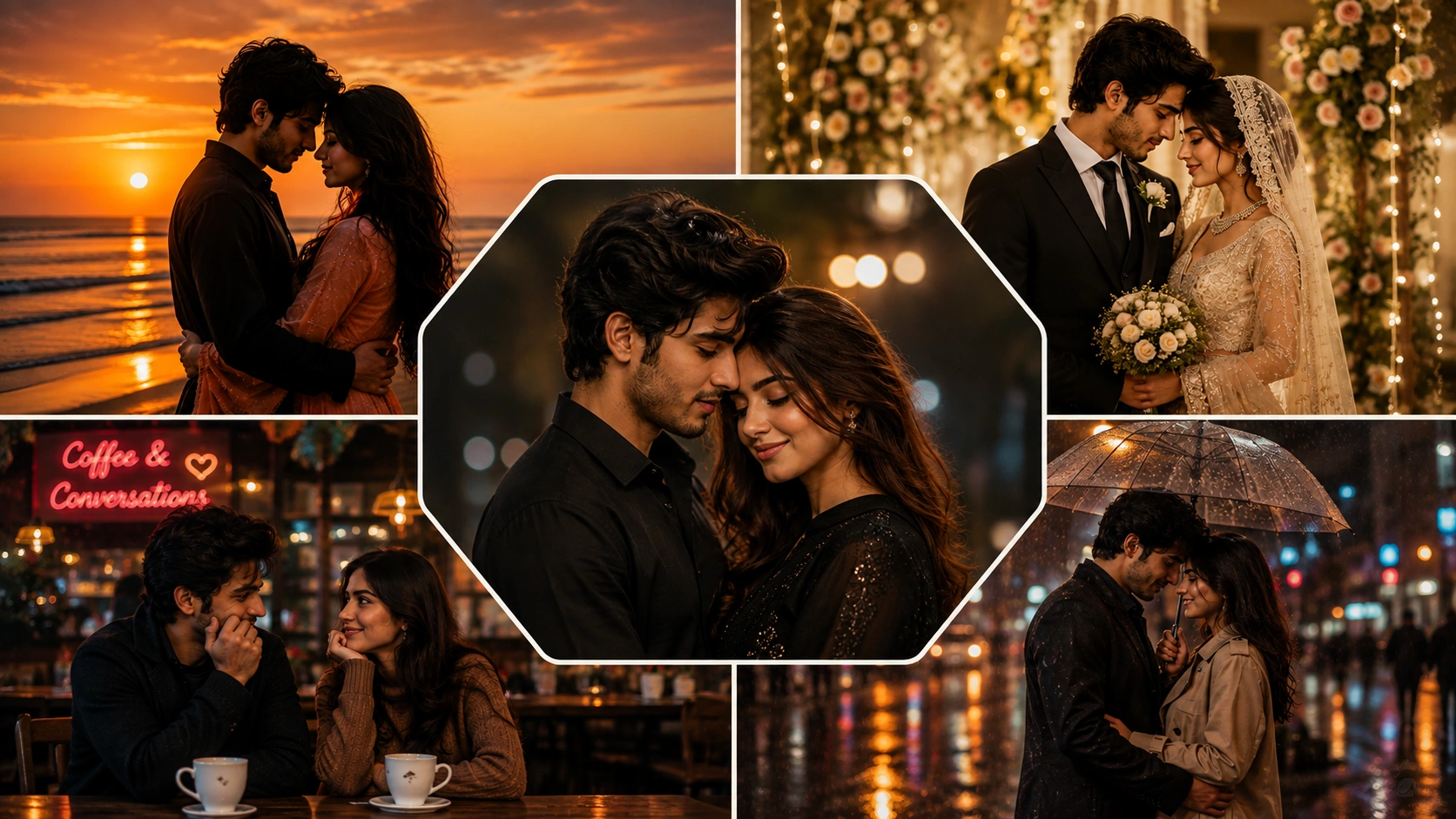
A couple of AI photo editing prompts help you turn simple photos into romantic, cinematic, wedding-style, or social media-ready portraits. A good prompt does more than say “make it romantic.” It explains the pose, mood, background, lighting, outfit style, camera look, and final image format.
Below are original couple AI photo editing prompts you can copy and customize for tools such as ChatGPT image tools, Gemini, or other AI photo editors that support image generation or photo editing. These prompts are not yet model-tested, so results can vary by tool, image quality, face angle, lighting, and model version.
How to Use These Couple AI Prompts
Upload a clear couple photo if the tool supports reference images. Use a photo where both faces are visible and not heavily blurred. Then copy one prompt, replace the details you want to change, and generate the image.
For better results, keep the prompt specific. Mention the scene, clothes, lighting, emotion, background, and aspect ratio. If you want an Instagram-style result, use a vertical 9:16 format. For blog thumbnails or landscape visuals, use 16:9.
1. Romantic Sunset Couple Portrait
Best for: Instagram couple edits, anniversary posts, soft romantic portraits
Aspect ratio: 9:16
Test status: not yet model-tested
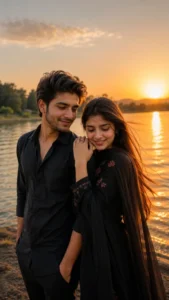
Prompt:
Create a realistic romantic couple portrait using the uploaded couple photo as the main reference. Keep both people natural and recognizable without changing their age, face shape, skin tone, hairstyle, or body proportions. Place them standing close together near a calm lakeside during golden hour sunset. Add warm orange sunlight, soft reflections on the water, gentle wind in the hair, natural smiles, cinematic depth of field, realistic skin texture, and a peaceful romantic mood. Use a vertical 9:16 composition suitable for Instagram stories.
Customizable elements: location, outfit color, sunset intensity, pose, background
2. Cinematic Rainy Street Couple Edit
Best for: dramatic couple edits, moody reels, romantic posters
Aspect ratio: 9:16
Test status: not yet model-tested

Prompt:
Use the uploaded couple photo as reference and create a cinematic rainy street couple photo. Keep the couple’s facial features natural and avoid over-smoothing the skin. Show them walking together under one umbrella on a quiet city street at night. Add soft street lights, wet road reflections, light rain, realistic shadows, warm highlights, natural clothing folds, and emotional eye contact. The image should look like a realistic romantic movie scene, not a cartoon or fantasy poster. Use a vertical 9:16 frame.
Customizable elements: umbrella color, city style, clothing, rain level, night or evening mood
3. Traditional Indian Couple Portrait
Best for: festival posts, wedding-style edits, ethnic couple photos
Aspect ratio: 4:5
Test status: not yet model-tested
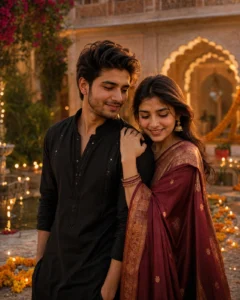
Prompt:
Create a realistic traditional Indian couple portrait using the uploaded photo as reference. Keep both identities natural and consistent, without reshaping faces or changing skin tone. Dress the woman in an elegant saree with subtle jewelry and the man in a refined kurta or sherwani. Place them in a warm heritage courtyard decorated with soft lights, flowers, and traditional details. Use natural expressions, realistic fabric texture, balanced golden lighting, soft background blur, and a premium wedding photography style. Use a 4:5 portrait frame.
Customizable elements: saree color, kurta color, decoration, festival theme, jewelry style
4. Cute Café Date Couple Prompt
Best for: casual romantic photos, lifestyle edits, soft social media posts
Aspect ratio: 4:5
Test status: not yet model-tested
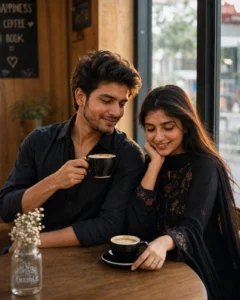
Prompt:
Turn the uploaded couple photo into a natural café date portrait. Keep the couple realistic and avoid making them look artificial. Show them sitting near a window in a cozy café, smiling and talking over coffee. Add soft daylight, warm wooden interior, natural hand placement, relaxed body language, realistic skin texture, gentle background blur, and a candid lifestyle photography look. The mood should feel sweet, simple, and real. Use a 4:5 vertical portrait composition.
Customizable elements: café style, drinks, outfits, expression, window light
5. Pre-Wedding Garden Couple Photo

Best for: engagement edits, romantic garden portraits, wedding invitation style visuals
Aspect ratio: 4:5
Test status: not yet model-tested
Prompt:
Create a pre-wedding style couple portrait from the uploaded reference photo. Keep the couple’s natural facial features and proportions. Place them in a beautiful garden with soft flowers, green trees, and warm evening light. Show the couple holding hands and looking at each other with a calm, romantic expression. Add elegant outfits, realistic fabric details, soft golden highlights, natural skin texture, shallow depth of field, and professional pre-wedding photography styling. Use a 4:5 portrait format.
Customizable elements: flower color, outfit style, pose, garden location, lighting
6. Royal Palace Couple AI Prompt
Best for: luxury couple edits, royal-style portraits, dramatic profile photos
Aspect ratio: 4:5
Test status: not yet model-tested
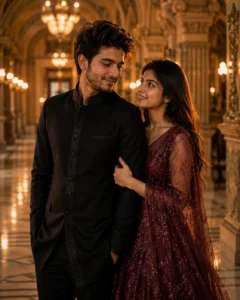
Prompt:
Create a royal cinematic couple portrait using the uploaded couple image as identity reference. Keep both people realistic and do not exaggerate facial features. Place them inside a grand palace hallway with marble flooring, warm chandelier lighting, carved pillars, and elegant background details. Dress them in classy formal outfits with rich but tasteful colors. Show a confident romantic pose, soft shadows, realistic textures, natural expressions, and premium editorial photography style. Use a 4:5 vertical frame.
Customizable elements: palace interior, outfit color, pose, jewelry, mood
7. Beach Vacation Couple Edit
Best for: travel edits, honeymoon style photos, summer couple posts
Aspect ratio: 16:9 or 4:5
Test status: not yet model-tested
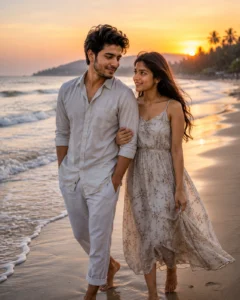
Prompt:
Use the uploaded couple photo to create a realistic beach vacation couple portrait. Keep both faces natural and recognizable. Show the couple walking barefoot near the shoreline during sunset, with soft waves, warm sky colors, light wind, relaxed smiles, and natural movement. Add realistic beach sand, gentle reflections, soft golden light, clean color grading, and a romantic travel photography mood. Avoid overly bright filters or plastic-looking skin.
Customizable elements: beach location, outfit, sunset color, walking or sitting pose, frame size
8. Mirror Selfie Couple Prompt
Best for: modern social media edits, casual couple profile pictures
Aspect ratio: 9:16
Test status: not yet model-tested
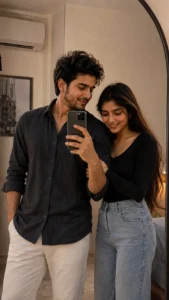
Prompt:
Create a modern mirror selfie style couple photo using the uploaded image as reference. Keep the couple’s natural appearance and avoid changing their facial structure. Place them in a clean modern room with soft lighting, a stylish mirror, neutral wall colors, and casual fashionable outfits. Show one person holding the phone while both stand naturally close together. Add realistic phone reflection, natural shadows, soft skin texture, and a clean Instagram-style edit. Use a vertical 9:16 format.
Customizable elements: room style, outfit, phone position, mirror size, lighting
9. Black Outfit Studio Couple Portrait
Best for: premium profile photos, couple display pictures, classy edits
Aspect ratio: 4:5
Test status: not yet model-tested
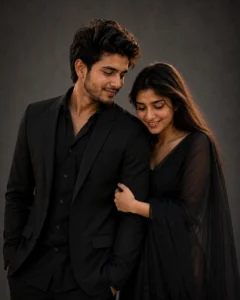
Prompt:
Create a premium studio portrait of the couple using the uploaded photo as reference. Keep both identities natural and balanced. Dress both people in elegant black outfits. Use a dark grey studio background, soft side lighting, subtle highlights on the face, natural skin texture, clean shadows, and a calm, confident expression. The final image should feel modern, classy, and realistic, like a professional couple photoshoot. Use a 4:5 portrait crop.
Customizable elements: background color, outfit style, lighting angle, pose, expression
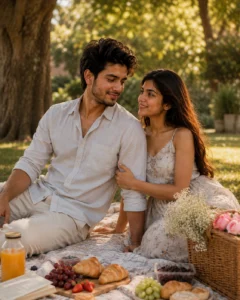
10. Romantic Picnic Couple Prompt
Best for: soft aesthetic edits, cute couple posts, outdoor lifestyle photos
Aspect ratio: 4:5
Test status: not yet model-tested
Prompt:
Transform the uploaded couple photo into a realistic romantic picnic scene. Keep both people natural and recognizable. Show them sitting together on a picnic blanket in a quiet park with soft sunlight, simple food items, flowers, trees, and a warm, peaceful mood. Add natural smiles, relaxed body posture, realistic grass texture, soft shadows, gentle color grading, and a candid photography feel. Use a 4:5 portrait frame.
Customizable elements: picnic setup, flowers, outfits, season, pose.
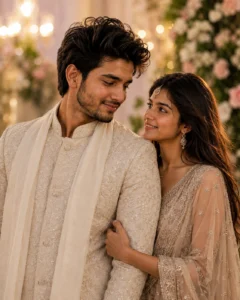
11. Wedding Couple Close-Up Prompt
Best for: wedding-style portraits, romantic close-up edits
Aspect ratio: 4:5
Test status: not yet model-tested
Prompt:
Create a realistic wedding-style close-up couple portrait using the uploaded reference photo. Keep both faces natural and avoid changing facial structure, skin tone, or age. Show the couple standing close together with soft smiles and emotional eye contact. Use elegant wedding outfits, warm indoor lighting, blurred decorative background, realistic jewelry and fabric texture, natural skin details, and professional wedding photography color grading. Use a 4:5 frame.
Customizable elements: wedding outfit, background decoration, smile level, lighting, crop
12. Bike Ride Couple Photo Prompt
Best for: youthful edits, travel couple photos, outdoor social media posts
Aspect ratio: 9:16
Test status: not yet model-tested

Prompt:
Use the uploaded couple photo as reference and create a realistic outdoor bike ride couple photo. Keep both people natural and recognizable. Show them sitting on a bike or scooter near a scenic road during golden hour. Add casual, stylish outfits, natural smiles, soft sunlight, road depth, realistic shadows, gentle wind, and a warm travel mood. The result should look like a real candid photo, not an advertisement. Use a vertical 9:16 format.
Customizable elements: bike type, road location, outfits, expression, background
Tips to Get Better Couple AI Results
Use clear reference photos where both faces are visible. Avoid photos with heavy blur, sunglasses covering the eyes, or extreme side angles.
Do not overload the prompt with too many styles. A rainy street photo, royal palace photo, and wedding photo should be separate prompts.
If the result changes the face too much, add: “keep natural facial structure, skin tone, hairstyle, and age consistent with the uploaded reference.”
If hands look strange, regenerate with simpler poses. Holding hands, walking side by side, or standing close together usually works better than complex finger poses.
If the image looks fake, ask for natural skin texture, realistic shadows, normal body proportions, and candid photography lighting.
Common Mistakes to Avoid
Do not ask for “100% perfect face match.” AI tools can improve consistency, but they cannot guarantee perfect identity preservation every time.
Do not use someone else’s private photo without permission. Couple prompts should be used with photos you own or have permission to edit.
Do not copy viral prompt text from another website and repost it as your own. Rewrite the scene in your own structure and add your own useful details.
Do not publish AI-generated couple images commercially unless you understand the tool’s usage rules, model policy, and any rights connected to the reference images.
