



A viral cinematic photo edit can turn a simple portrait into a dramatic social media-ready image with movie-style lighting, depth, mood and color grading. The right prompt matters because ChatGPT needs clear direction about the scene, subject, background, lighting, camera style and final mood.
This guide gives you copy-ready viral cinematic photo editing prompts for ChatGPT. You can use them for Instagram posts, profile photos, reels covers, story edits or creative AI portrait ideas.
Quick takeaway: Use a clear photo, describe the cinematic scene, ask for natural facial detail, and avoid overloading the prompt with too many effects at once.
What Makes a Cinematic Photo Edit Look Viral?
A cinematic edit usually has a few strong visual elements:
- Dramatic lighting
- Realistic shadows
- Shallow depth of field
- Film-style color grading
- Natural skin texture
- Background atmosphere
- A clear subject focus
The best ChatGPT photo editing prompt does not simply say “make it cinematic.” It tells the AI what kind of cinematic mood to create.
For example, “rainy night street with neon lights” gives a clearer result than “make this photo viral.”
How to Use These ChatGPT Photo Editing Prompts
- Upload a clear portrait or full-body photo.
- Copy one prompt from below.
- Paste it into ChatGPT with image editing enabled.
- Replace details like outfit, background, color tone or mood if needed.
- Generate the image and refine with a short follow-up prompt.
Use a photo where the face is visible, lighting is clean and the subject is not heavily blurred. This helps the final edit look more natural.
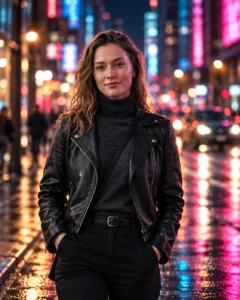
1. Viral Street Cinematic Photo Editing Prompt
Best for: Instagram profile photos, stylish street portraits
Prompt:
Transform this photo into a viral cinematic street portrait. Keep the original person’s facial features natural and recognizable. Place the subject on a modern city street at night with soft neon lights, wet road reflections, shallow depth of field, realistic shadows and a premium movie-style color grade. Add subtle background blur, gentle highlights on the face, natural skin texture and a confident cinematic pose. Keep the outfit stylish but realistic. Do not add text, logo, watermark, extra fingers or distorted body parts.
Recommended Aspect Ratio: 4:5
Customizable Elements: Neon color, outfit style, city background, expression
Test Status: Not yet model-tested
2. Outdoor Golden Hour Cinematic Prompt
Best for: Natural outdoor portraits

Prompt:
Edit this image into a cinematic golden hour outdoor portrait. Keep the person’s face realistic and close to the original photo. Add warm sunset light, soft rim lighting, natural shadows, a blurred outdoor background, subtle film grain and rich cinematic contrast. The scene should feel peaceful, premium and realistic, like a movie still captured with a DSLR camera. Keep the pose natural and avoid over-editing the skin.
Recommended Aspect Ratio: 4:5 or 16:9
Customizable Elements: Background, sunlight strength, outfit color, camera angle
Test Status: Not yet model-tested
3. Rainy Cinematic AI Photo Prompt
Best for: Emotional, moody and dramatic edits

Prompt:
Create a realistic rainy cinematic photo edit from this image. Keep the subject sharp and natural. Add a dark rainy street background, soft raindrops, wet ground reflections, moody blue and grey color grading, cinematic haze and gentle light falling on the face. The photo should look emotional but not fake. Keep the original face structure natural, preserve realistic skin texture and avoid cartoon effects.
Recommended Aspect Ratio: 4:5
Customizable Elements: Rain intensity, background street, mood, lighting color
Test Status: Not yet model-tested
4. Dark Studio Cinematic Portrait Prompt
Best for: Premium profile pictures and dramatic portraits

Prompt:
Turn this photo into a dark cinematic studio portrait. Keep the subject’s face natural and realistic. Use a black or deep grey background, soft side lighting, strong facial depth, realistic shadows, subtle highlights, premium editorial color grading and a clean professional portrait look. Add a slight film texture and shallow depth of field. The final image should look sharp, high-end and suitable for a social media profile picture.
Recommended Aspect Ratio: 1:1 or 4:5
Customizable Elements: Background color, lighting side, outfit, expression
Test Status: Not yet model-tested
5. Travel Cinematic Photo Editing Prompt
Best for: Travel photos, reels covers and lifestyle edits

Prompt:
Convert this image into a cinematic travel portrait. Keep the person realistic and centered. Add a beautiful travel background such as mountains, an empty road, airport window, beach sunset or scenic city view. Use natural lighting, warm cinematic tones, soft background blur, realistic shadows and a travel-film mood. The edit should feel adventurous, clean and premium without looking artificial.
Recommended Aspect Ratio: 16:9 or 4:5
Customizable Elements: Location, outfit, weather, time of day
Test Status: Not yet model-tested
Best Tips for Better Results
Use these small changes to improve the output:
- Add “keep the original facial features natural and recognizable.”
- Mention the exact background you want.
- Use one main lighting style, not five at once.
- Ask for “realistic skin texture” to avoid plastic-looking faces.
- Add “do not add text or watermark.”
- If hands look bad, crop the image closer or ask for hands to remain relaxed and natural.
Common Problems and Fixes
The face looks different
Use a clearer original photo and add: “preserve the original face structure, skin tone and natural expression.”
The image looks too fake
Remove words like “ultra fantasy,” “surreal,” or “hyper magical.” Use “realistic cinematic photo” instead.
The background looks messy
Ask for a simpler background: “clean blurred city street background with no extra people.”
The colors are too strong
Add: “use subtle cinematic color grading, not oversaturated colors.”
The edit does not look viral
Be more specific. Mention the mood: rainy night, golden hour, dark studio, travel film, neon street or premium portrait.
Conclusion
A strong viral cinematic photo editing prompt for ChatGPT should be clear, visual and realistic. Instead of using a short command like “make it cinematic,” describe the scene, lighting, background, camera feel and final mood.
Start with one prompt from this guide, generate the image, then refine it with small changes. That will give better results than changing the whole prompt every time.
CTA: Copy one prompt above, upload your photo, and test which cinematic style fits your image best.
