


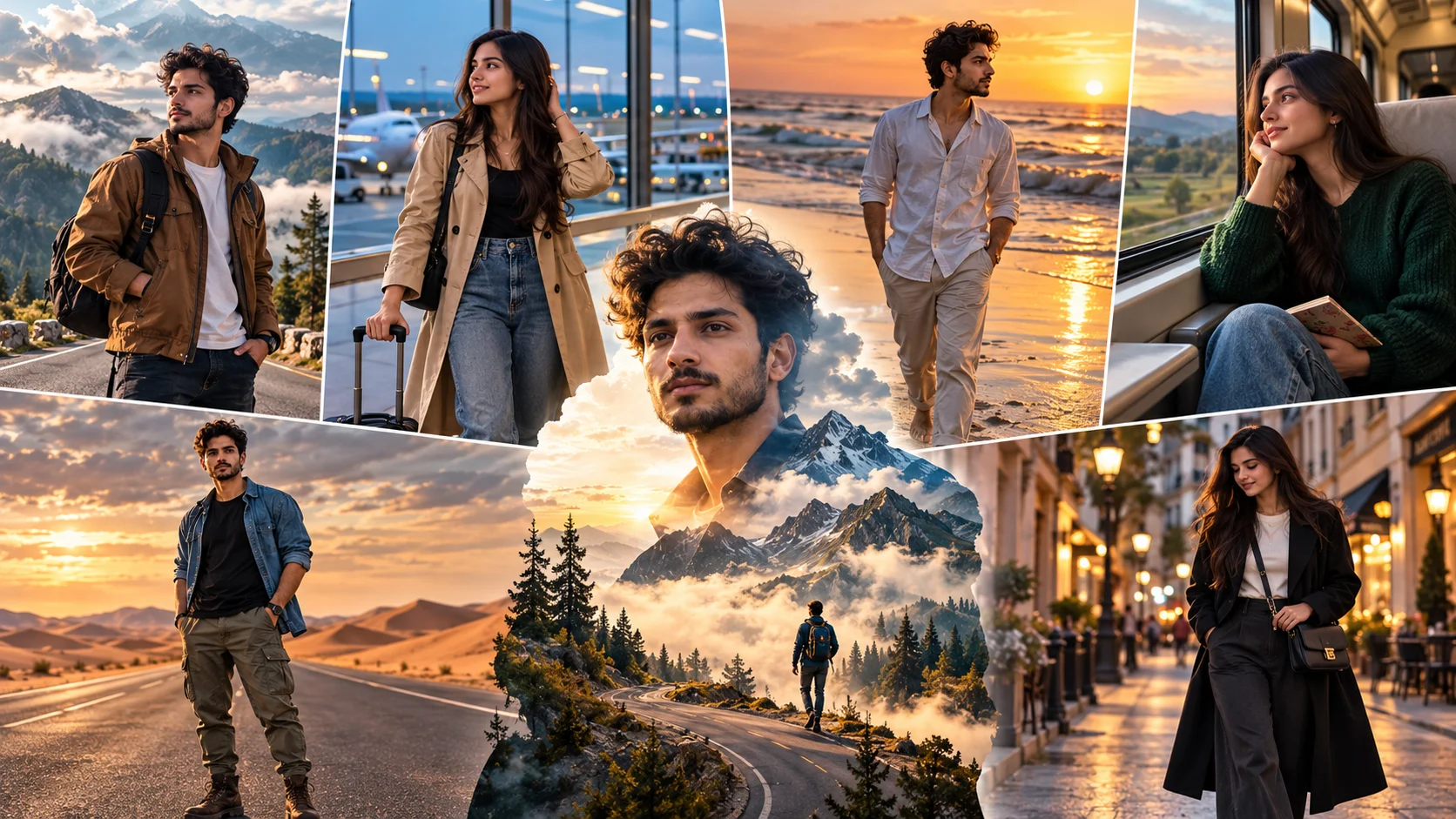
Cinematic travel photo editing prompts are used to turn a normal portrait into a premium travel-style image. These prompts can create mountain trips, airport looks, beach sunsets, train journeys, desert scenes, city travel portraits and poster-style edits.
This style is popular because it makes an ordinary photo feel like a travel campaign, Instagram reel cover or cinematic trip memory. A strong travel prompt should not only change the background. It should also control the outfit, pose, camera angle, lighting, face direction, mood and destination details.
Below are copy-ready cinematic travel AI prompts for boys and girls. You can use them in ChatGPT image tools, Gemini or any AI editor that supports reference image editing.
1. Mountain Road Travel Prompt for Boys
Best for: Adventure portrait, mountain trip edit, stylish travel DP
Prompt:
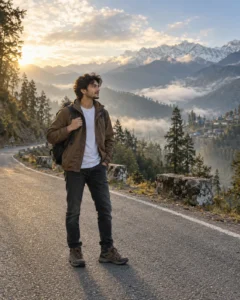
Create a realistic cinematic mountain travel portrait using the uploaded boy’s face as reference. Show him standing on a quiet mountain road with misty hills, pine trees and soft clouds in the background. He is wearing a brown travel jacket, white t-shirt, dark jeans and hiking shoes. His pose should be natural, with one hand holding a small backpack strap and the other hand relaxed by his side. Keep his face at a three-quarter angle, looking slightly toward the mountains with a calm confident expression. Add golden morning light, soft fog, realistic road texture, natural skin detail, cinematic depth of field and premium travel photography color grading. Avoid fake mountains, distorted face, extra fingers, unrealistic shadows, text, logo and watermark.
Recommended Aspect Ratio: 4:5
Customizable Elements: Jacket color, mountain location, fog level, backpack style
Test Status: Not yet model-tested
2. Airport Window Travel Prompt for Girls
Best for: Airport aesthetic, travel story cover, stylish girl portrait

Prompt:
Create a realistic cinematic airport travel portrait using the uploaded girl’s face as reference. Show her standing near a large airport window with a plane and runway lights softly blurred in the background. She is wearing a beige trench coat, black top, straight-fit jeans and white sneakers, holding a small travel bag. Her pose should be relaxed, with one hand holding the bag handle and the other hand lightly touching her hair. Keep her face slightly turned toward the window, looking outside with a soft excited expression. Add cool airport lighting, realistic glass reflection, natural skin texture, clean travel mood and cinematic blue-grey color grading. Avoid fake airplane details, distorted hands, over-smoothed face, text and watermark.
Recommended Aspect Ratio: 4:5 or 9:16
Customizable Elements: Outfit color, airport background, luggage style, expression
Test Status: Not yet model-tested
3. Beach Sunset Travel Prompt for Boys
Best for: Vacation edit, beach travel photo, golden-hour portrait

Prompt:
Create a realistic cinematic beach travel portrait using the uploaded boy’s face as reference. Show him walking near the shoreline during sunset with ocean waves, soft orange sky and wet sand reflections. He is wearing a light linen shirt, rolled sleeves, beige trousers and casual sandals. His pose should look candid, with one hand in his pocket and his body slightly angled away from the camera. Keep his face in side profile, looking toward the sunset with a peaceful thoughtful expression. Add warm golden light, realistic ocean movement, natural shadows, detailed wet sand reflection, soft background blur and travel magazine-style color grading. Avoid fake water, distorted feet, changed face, text and watermark.
Recommended Aspect Ratio: 9:16
Customizable Elements: Shirt color, beach mood, sunset intensity, walking pose
Test Status: Not yet model-tested
4. Train Window Journey Prompt for Girls
Best for: Emotional travel photo, train journey edit, cinematic girl portrait
Prompt:
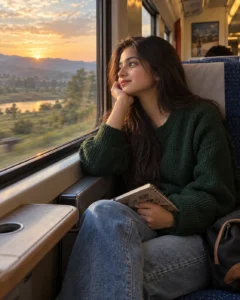
Create a realistic cinematic train travel photo using the uploaded girl’s face as reference. Show her sitting beside a train window while soft countryside scenery passes outside. She is wearing a cozy dark green sweater, blue jeans and minimal accessories. Her pose should be natural, with one elbow resting near the window and one hand holding a small notebook. Keep her face at a three-quarter angle, looking out of the window with a calm thoughtful expression. Add warm window light, realistic train interior, slight motion blur outside, natural skin texture, soft shadows and nostalgic travel-film color grading. Avoid unrealistic train interior, distorted hands, excessive blur, text and watermark.
Recommended Aspect Ratio: 4:5
Customizable Elements: Sweater color, window view, notebook, lighting mood
Test Status: Not yet model-tested
5. Desert Road Travel Prompt for Boys
Best for: Bold travel portrait, road trip image, cinematic desert look

Prompt:
Create a realistic cinematic desert travel portrait using the uploaded boy’s face as reference. Show him standing on an empty desert road with sand dunes and a dramatic sky in the background. He is wearing a black t-shirt, open denim shirt, cargo pants and boots. His pose should be strong but natural, with arms relaxed and shoulders slightly turned. Keep his face front-facing with a confident serious expression, looking directly toward the camera. Add warm desert light, realistic dust in the air, long shadows, cinematic contrast, natural skin texture and wide-angle travel photography composition. Avoid fake sand, unrealistic sky, extra limbs, plastic skin, text and watermark.
Recommended Aspect Ratio: 16:9 or 4:5
Customizable Elements: Denim shirt color, desert road, dust level, sky mood
Test Status: Not yet model-tested
6. City Street Travel Prompt for Girls
Best for: Urban travel edit, city vacation post, stylish Instagram photo

Prompt:
Create a realistic cinematic city travel portrait using the uploaded girl’s face as reference. Show her walking on a clean city street with cafes, soft streetlights and blurred buildings in the background. She is wearing a long black coat, white top, wide-leg trousers and sneakers, carrying a small crossbody bag. Her pose should look candid, mid-walk, with one hand holding the bag strap. Keep her face slightly tilted downward, looking to the side with a calm confident expression. Add evening city light, realistic street reflections, natural skin texture, soft bokeh, detailed clothing folds and premium travel photography grading. Avoid crowded background, distorted walking pose, fake buildings, text and watermark.
Recommended Aspect Ratio: 4:5
Customizable Elements: City style, coat color, bag type, street lighting
Test Status: Not yet model-tested
7. Double Exposure Travel Poster Prompt
Best for: Viral travel poster, creative profile image, destination concept

Prompt:
Create a realistic cinematic double-exposure travel poster using the uploaded portrait as reference. Keep the subject natural and place the portrait in the center with a soft silhouette blend. Inside the silhouette, blend a scenic travel destination with mountains, winding roads, clouds, trees and a small traveler figure in the distance. Keep the subject’s face naturally recognizable where possible, with realistic skin texture and soft cinematic lighting. Use matte travel-poster color grading, clean composition, atmospheric depth, subtle fog and premium editorial style. Do not add readable text, logos, watermarks, fake stamps or distorted facial features.
Recommended Aspect Ratio: 4:5 or 9:16
Customizable Elements: Destination, landscape type, color mood, silhouette strength
Test Status: Not yet model-tested
How to Use These Travel Prompts
- Upload a clear portrait photo.
- Copy the prompt that matches your travel scene.
- Paste it into ChatGPT, Gemini or another AI image editor.
- If the face changes too much, add: “keep natural recognizable facial features where possible.”
- If the background looks fake, add: “use realistic travel photography depth and natural shadows.”
- Generate again with small changes instead of replacing the full prompt.
Customization Tips
You can change the destination and still keep the prompt structure:
- Replace mountain road with Manali, Kashmir, Rishikesh, Dubai desert, Goa beach or London street.
- Change golden hour to cloudy, rainy, blue hour or night city light.
- Use 9:16 for reels covers and wallpapers.
- Use 4:5 for Instagram feed posts.
- Use 16:9 for cinematic travel banners.
- Keep outfits realistic for the location.
Common Problems and Fixes
Problem: Background looks pasted.
Fix: Add “match subject lighting with the background and use realistic shadows.”
Problem: Face changes too much.
Fix: Add “preserve natural recognizable facial features where possible.”
Problem: Travel scene looks too crowded.
Fix: Add “clean background with no crowd and no distracting objects.”
Problem: Outfit does not match the destination.
Fix: Add location-specific clothing, such as jacket for mountains or linen shirt for beach.
Problem: Image looks like a poster instead of a real photo.
Fix: Use the simple travel filter prompt or remove words like “poster” and “double exposure.”
Frequently Asked Questions
What is a cinematic travel photo editing prompt?
It is a text instruction that tells an AI image tool to create a travel-style portrait with realistic destination details, lighting, outfit, pose and cinematic color grading.
Can boys and girls both use these travel prompts?
Yes. These prompts include boys and girls versions, and you can replace gender wording based on the uploaded photo.
Which travel prompt is best for Instagram?
Mountain road, airport window, beach sunset and city street prompts work well for Instagram because they look natural and visually clear.
Can I create a travel poster with AI?
Yes. Use the double exposure travel poster prompt, but keep it clean and avoid adding unreadable text.
Which aspect ratio should I use?
Use 4:5 for Instagram posts, 9:16 for reels or stories, and 16:9 for wide travel banners.
Will AI keep the same face?
It can preserve natural recognizable facial features where possible, but no AI tool can guarantee perfect face accuracy every time.
Final Words
Cinematic travel prompts work best when the destination, outfit, lighting, pose and facial expression all match. Start with one scene, then adjust the location, weather and outfit until the image feels like a real travel photograph instead of a random AI background.
