



A car and bike route destination AI photo editing prompt is used to turn a normal vehicle photo into a cinematic road-trip style image. This trend usually includes a bike or car, an open road, a travel destination, map route lines, GPS-style overlays, sunset lighting and a strong adventure mood.
The mistake many people make is adding too many fake map graphics. A good route destination edit should still look like a real travel photograph. The route effect should support the image, not cover the face, vehicle or background.
Below are copy-ready prompts for ChatGPT, Gemini and other AI photo editing tools.
1. Highway Bike Route Destination Prompt
Best for: Boys bike travel photo, highway rider edit

Prompt:
Create a realistic cinematic bike route destination edit using the uploaded photo as reference. Keep natural recognizable facial features where possible. Show the boy standing beside a black motorcycle on an empty highway during golden hour. Add a subtle glowing GPS route line on the road leading toward a distant mountain destination. The boy should wear a stylish black jacket, jeans and clean sneakers, standing in a relaxed confident pose while looking slightly toward the camera with a calm expression. Add realistic bike details, warm sunset light, natural shadows, road-trip atmosphere and shallow depth of field. Avoid fake route graphics over the face, distorted bike wheels, unreadable messy text, extra hands, logo and watermark.
Recommended Aspect Ratio: 4:5 or 9:16
Customizable Elements: Bike color, destination type, outfit, route glow color
Test Status: Not yet model-tested
2. Car Road Trip Destination Prompt
Best for: Car lifestyle portrait, travel post
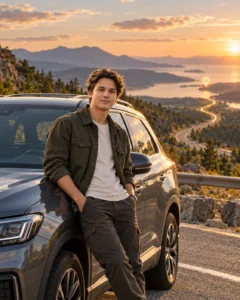
Prompt:
Edit the uploaded photo into a realistic car road trip destination scene. Place the subject beside a clean modern car on a scenic highway viewpoint with hills in the background. Add a soft GPS-style route line on the road and a small minimal destination marker near the horizon. The subject should wear a casual travel outfit, leaning lightly near the car with a natural confident smile. Keep the car realistic with believable reflections, proper tires, glass detail and natural shadows. Use warm cinematic daylight, clean road-trip color grading and realistic camera depth. Avoid fake car badges, broken reflections, route lines covering the body, text errors, logo and watermark.
Recommended Aspect Ratio: 4:5 or 16:9
Customizable Elements: Car color, road location, outfit, destination marker
Test Status: Not yet model-tested
3. Girl Bike Route Travel Prompt
Best for: Girls stylish travel edit, adventure portrait

Prompt:
Create a stylish bike route destination photo edit using the uploaded girl photo as reference. Show her standing near a matte white motorcycle on a clean open road with a soft sunrise background. Add a thin glowing route path on the road, moving from the foreground toward a distant travel destination. She should wear a modest stylish jacket, fitted trousers and travel sneakers, standing sideways with one hand near the bike handle and a soft confident smile. Keep natural skin texture, realistic hair movement, believable lighting and premium travel photography style. Avoid over-glamour styling, distorted bike parts, extra fingers, fake map text, logo and watermark.
Recommended Aspect Ratio: 4:5
Customizable Elements: Bike color, outfit, sunrise strength, pose
Test Status: Not yet model-tested
4. Car and Bike Group Route Prompt
Best for: Friends travel edit, boys and girls road-trip post
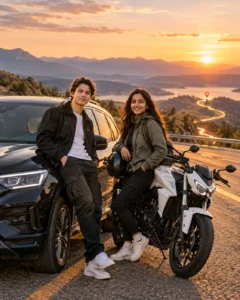
Prompt:
Transform the uploaded group photo into a cinematic car and bike destination route scene. Show the friends standing together beside one car and one motorcycle on a clean roadside viewpoint. Add a subtle map route effect across the lower road area, with a small destination pin in the distance. Each person should have a natural pose, different face angle and relaxed travel expression. Use realistic vehicle scale, natural shadows, warm outdoor light and road-trip color grading. Keep the scene clean and believable. Avoid crowded overlays, duplicate people, distorted hands, fake vehicle parts, unreadable text, logo and watermark.
Recommended Aspect Ratio: 16:9 or 4:5
Customizable Elements: Number of people, vehicle style, destination, lighting mood
Test Status: Not yet model-tested
5. Night City Route Destination Prompt
Best for: Urban car/bike edit, modern night travel look
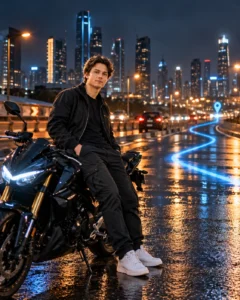
Prompt:
Create a realistic night city route destination edit using the uploaded photo as reference. Place the subject beside a bike or car on a wet city road with soft neon reflections and blurred background lights. Add a clean blue GPS route line on the road surface, leading toward a distant city destination marker. The subject should wear a dark stylish outfit, looking slightly away from the camera with a serious cinematic expression. Add realistic wet-road reflections, natural skin texture, vehicle detail, soft bokeh and blue-orange cinematic lighting. Avoid excessive neon, fake route UI covering the face, distorted vehicle shape, text errors and watermark.
Recommended Aspect Ratio: 4:5 or 9:16
Customizable Elements: Vehicle type, city background, route color, expression
Test Status: Not yet model-tested
6. Mountain Road Bike Destination Prompt
Best for: Adventure bike portrait, travel wallpaper
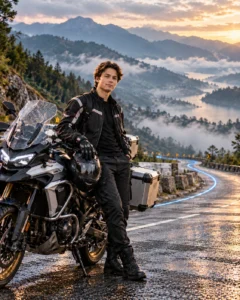
Prompt:
Edit the uploaded photo into a mountain road bike destination scene. Show the subject standing beside a touring motorcycle on a curved mountain road with misty hills in the background. Add a subtle route line following the road curve, making it feel like a real travel map path. The subject should wear a riding jacket, gloves and travel boots, standing in a strong relaxed pose with helmet held naturally in one hand. Keep the face visible, natural and realistic. Add cool morning light, mist, realistic road texture, accurate bike details and cinematic adventure photography. Avoid floating bike parts, fake mountains, hidden face, extra fingers, text and watermark.
Recommended Aspect Ratio: 4:5 or 16:9
Customizable Elements: Mountain style, bike type, outfit, mist level
Test Status: Not yet model-tested
7. Desert Route Car Destination Prompt
Best for: Luxury travel edit, cinematic car portrait

Prompt:
Create a realistic desert route destination car photo using the uploaded image as reference. Place the subject beside a clean SUV or sports car on a desert highway during sunset. Add a minimal glowing route line on the road and a far destination pin near the horizon. The subject should wear a stylish travel outfit, standing with one shoulder angled toward the camera, calm confident expression and natural posture. Add warm desert light, realistic car paint reflections, natural shadows, dust atmosphere and premium cinematic color grading. Avoid fake sandstorm effects, wrong car proportions, route graphics on the face, text errors and watermark.
Recommended Aspect Ratio: 16:9 or 4:5
Customizable Elements: Car type, desert color, outfit, route marker
Test Status: Not yet model-tested
How to Use These Prompts
- Upload a clear photo with a visible face.
- Choose whether the edit should use a car, bike or both.
- Copy the prompt that matches the desired style.
- Replace destination details if needed, such as mountain, city, beach, desert or highway.
- If the route overlay looks messy, add: “keep the route graphic subtle and only on the road.”
- If the vehicle looks fake, add: “keep realistic vehicle proportions, tires, reflections and shadows.”
Customization Tips
Use golden hour for warm travel edits, night city for modern cinematic edits, mountain roads for adventure style and rainy roads for emotional edits.
For boys, jackets, jeans, riding boots and confident poses usually work well. For girls, stylish jackets, travel outfits, soft confident expressions and clean side poses work better. Keep the vehicle realistic and avoid covering the face with GPS effects.
Common Problems and Fixes
If the route line covers the face, add: “route overlay should stay on the road only.”
If the vehicle looks broken, add: “accurate wheels, correct reflections and realistic vehicle scale.”
If the destination text becomes unreadable, remove text and use only a simple destination pin.
If the edit looks too artificial, reduce neon, route glow and background effects.
Frequently Asked Questions
What is a car and bike route destination AI photo editing prompt?
It is a text prompt that turns a normal car or bike photo into a cinematic travel image with route, destination and road-trip effects.
Which category should this post use?
Use Girls and Boys AI Prompts because this topic can work for both boys and girls.
Can I use these prompts in ChatGPT?
Yes, you can use them in ChatGPT image tools if your account supports image upload and image editing.
Should the route overlay include text?
Keep text minimal. AI often makes text messy, so a simple route line and destination pin usually looks cleaner.
What is the best aspect ratio?
Use 4:5 for Instagram posts, 9:16 for stories and reels, and 16:9 for featured images.
Are these prompts tested?
No. These prompts are not yet model-tested, so results may vary by tool, model version and photo quality.
Final Words
Car and bike route destination prompts work best when the route effect is subtle and the vehicle still looks real. Keep the road, pose, vehicle and lighting believable. For more mixed boys and girls editing ideas, use the Girls and Boys AI Prompts category.
