


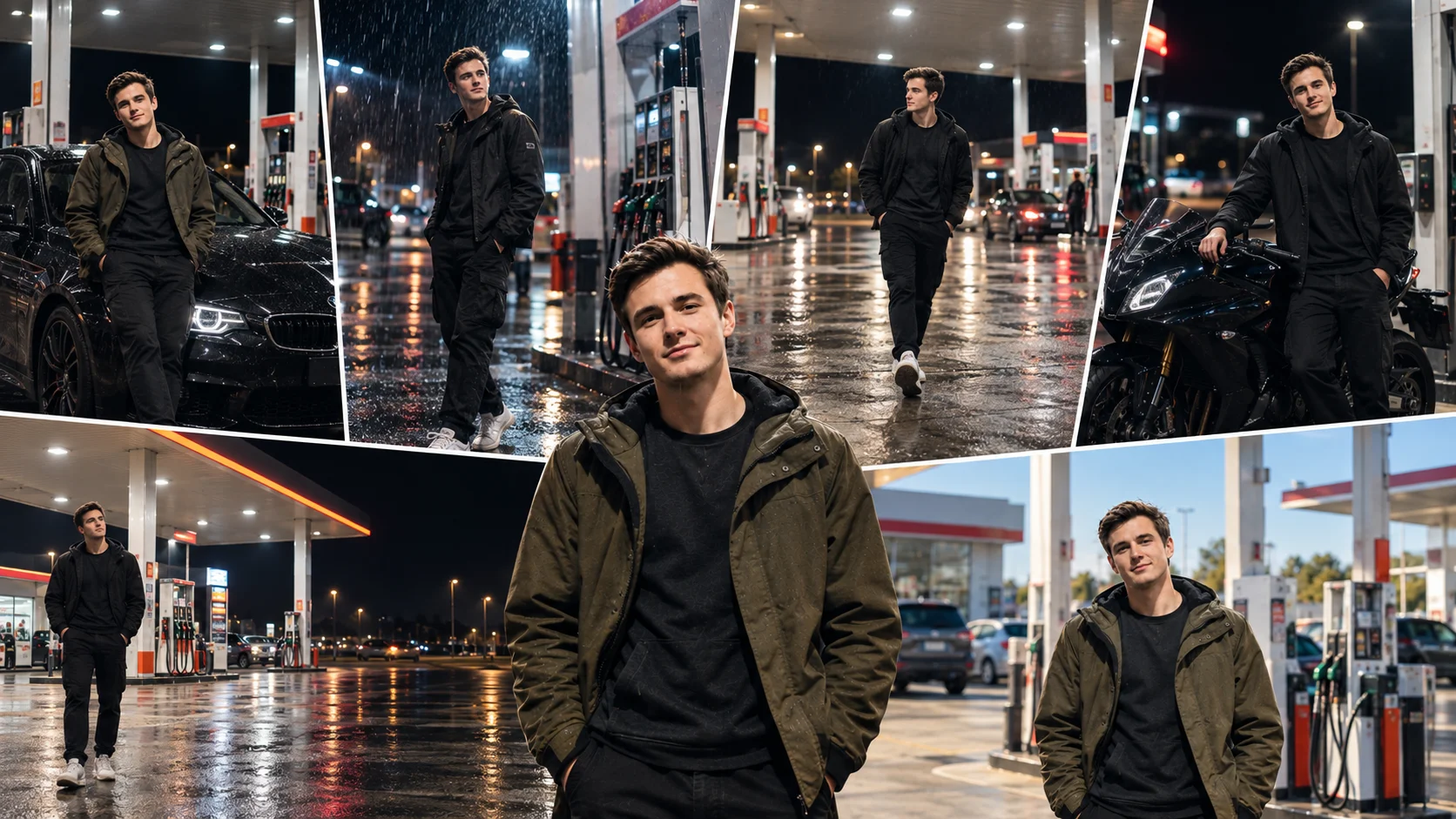
Petrol pump AI photo editing is one of the most viral portrait styles right now. The look is simple but powerful: a stylish boy standing near a fuel station, bright canopy lights above, road reflections below, and a cinematic night atmosphere around the subject.
This type of photo works well for Instagram posts, profile pictures, reels covers, WhatsApp DP images and stylish social media edits. In this article, you will get copy-ready petrol pump AI photo editing prompts for boys, including night station, bike, car, rainy and daytime styles.
These prompts are written for ChatGPT image tools, Gemini and other AI photo editing tools that support prompt-based image editing. Results can vary depending on the uploaded image quality, model version, lighting and pose.
How to Use These Petrol Pump AI Prompts
Upload a clear photo first if your AI tool supports image editing. A full-body or half-body photo works better than a tight selfie because petrol pump edits need proper body position, scale and background perspective.
Then copy one prompt from below and paste it into your AI tool. If you want a more realistic result, mention your outfit, pose and whether you want night, daytime, rainy or bike style.
Avoid using blurry photos, heavily filtered selfies or photos where the face is too small. These can make the final result look fake or distorted.
1. Night Petrol Pump AI Photo Editing Prompt
Best for: Viral Instagram post, profile photo, cinematic night edit
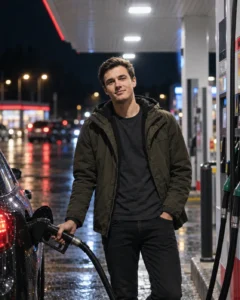
Prompt:
Create a realistic cinematic night petrol pump photo edit using the uploaded boy photo as the main subject reference. Place him naturally near a modern petrol pump at night, standing beside a fuel dispenser with a relaxed confident pose. Keep the face natural and recognizable from the reference photo without over-smoothing the skin. Add bright white canopy lights, soft blue and red station glow, realistic ground shadows, wet road reflections, detailed fuel pumps, dark road background and DSLR-style photography. Keep body proportions natural, outfit realistic and lighting consistent with the petrol station environment. No text, no watermark, no logo.
Recommended Aspect Ratio: 4:5
Customizable Elements: Outfit, pose, station lighting, background road
Test Status: Not yet model-tested
2. Petrol Pump Bike Photo Prompt
Best for: Boys bike edit, attitude photo, reels thumbnail
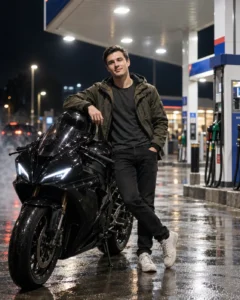
Prompt:
Transform the uploaded photo into a stylish petrol pump bike photoshoot. Show the boy standing beside a black sports bike at a modern petrol pump during night time. Keep the face natural, hairstyle realistic and outfit detailed. Add bright canopy lighting, fuel dispenser background, soft road reflections, realistic bike shadows, cinematic contrast, slight smoke effect near the ground and professional DSLR color grading. The subject should look naturally placed in the scene, not pasted. Avoid extra fingers, distorted hands, fake bike parts, text, logos and watermark.
Recommended Aspect Ratio: 4:5 or 9:16
Customizable Elements: Bike color, outfit, pose, smoke level
Test Status: Not yet model-tested
3. Petrol Pump Car Portrait Prompt
Best for: Car lifestyle photo, luxury edit, dark cinematic look
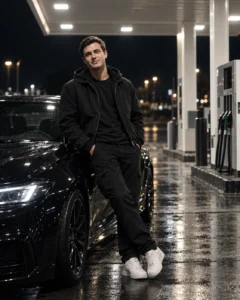
Prompt:
Create a cinematic petrol pump car portrait of a stylish boy leaning casually against a black car at a fuel station at night. Keep the boy’s facial features natural and realistic from the reference photo. Add glowing petrol pump canopy lights, clean fuel dispenser background, shiny car reflections, wet road texture, soft shadows under the shoes, premium streetwear outfit, confident expression and high-detail DSLR photography. Use realistic lighting and natural body posture. No text, no watermark, no brand logo, no unrealistic face changes.
Recommended Aspect Ratio: 4:5
Customizable Elements: Car color, outfit style, pose, background lights
Test Status: Not yet model-tested
4. Rainy Petrol Pump AI Photo Prompt
Best for: Moody portrait, emotional edit, cinematic rainy photo

Prompt:
Edit the uploaded image into a realistic rainy petrol pump portrait. Show the boy standing under bright fuel station lights during a light rain at night. Keep the face visible and natural, with realistic skin texture and accurate body shape. Add falling raindrops, wet road reflections, misty background, glowing canopy lights, soft shadows, detailed fuel pumps and cinematic blue-orange color grading. The mood should feel dramatic but realistic. Avoid plastic skin, face distortion, messy rain effects, text and watermark.
Recommended Aspect Ratio: 4:5 or 9:16
Customizable Elements: Rain level, expression, outfit, light color
Test Status: Not yet model-tested
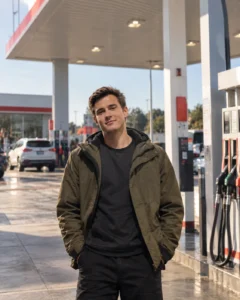
5. Daytime Petrol Pump Photo Prompt
Best for: Clean realistic edit, daylight social media post
Prompt:
Create a realistic daytime petrol pump photo edit of the boy from the uploaded image. Place him naturally in front of a clean modern fuel station during soft daylight. Keep facial details natural, outfit realistic and body posture relaxed. Add fuel dispensers, station canopy, parked vehicles in the distance, natural shadows, realistic ground texture, clear sky and professional photography color grading. The final image should look like a real outdoor photoshoot, not an artificial background replacement. No text, no logo, no watermark.
Recommended Aspect Ratio: 4:5
Customizable Elements: Outfit, daylight tone, background vehicles, pose
Test Status: Not yet model-tested
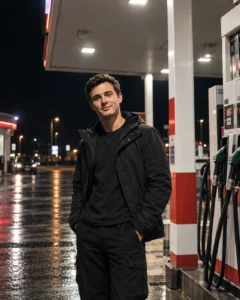
6. Petrol Pump Attitude Pose Prompt
Best for: Stylish boys photo, bold Instagram look
Prompt:
Create a viral attitude-style petrol pump photo edit. Show the boy standing near a fuel dispenser at night, one hand in pocket, shoulders slightly turned, confident expression and relaxed body posture. Keep the original facial features natural without making the face look artificial. Add strong overhead canopy lighting, dark highway background, glowing station lights, realistic ground shadow, premium black outfit, cinematic contrast and sharp DSLR detail. Keep the petrol pump environment realistic and clean. No text, no watermark, no extra people.
Recommended Aspect Ratio: 4:5
Customizable Elements: Pose, outfit color, expression, station background
Test Status: Not yet model-tested
7. Petrol Pump Walking Shot Prompt
Best for: Natural candid look, less stiff pose

Prompt:
Turn the uploaded photo into a candid walking petrol pump photoshoot. Show the boy walking slowly across a petrol station forecourt at night, looking slightly to the side with a natural expression. Keep face details realistic, outfit sharp and body movement believable. Add bright canopy lighting, fuel pumps behind him, soft motion blur in the background, wet road reflections, realistic shoe shadows and cinematic street photography color grading. Avoid stiff pose, extra limbs, distorted hands, text and watermark.
Recommended Aspect Ratio: 4:5 or 9:16
Customizable Elements: Walking direction, outfit, background blur, lighting
Test Status: Not yet model-tested
Best Tips for Realistic Petrol Pump Edits
Use a photo where the body is visible. Petrol pump edits look better when the AI can understand the full pose.
Mention the pose clearly. If you only write “standing at petrol pump,” the result may look stiff. Use details like “leaning against a dispenser,” “walking across the forecourt” or “standing beside a bike.”
Control the lighting. Petrol pump edits depend on canopy lights, shadows and reflections. Add words like “realistic overhead lighting,” “wet road reflection” and “natural ground shadow.”
Avoid overclaiming identity preservation. AI tools can try to keep the face natural, but they cannot guarantee exact face matching every time.
Common Problems and Fixes
If the face changes too much, add:
“Keep the original facial features natural and avoid changing the identity too much.”
If the body pose looks stiff, add:
“Use a relaxed natural pose with realistic body posture.”
If the petrol pump looks fake, add:
“Use a realistic modern petrol station with detailed fuel dispensers and natural perspective.”
If the lighting does not match, add:
“Match the subject lighting with overhead canopy lights and realistic ground shadows.”
If the image becomes too dark, add:
“Keep the subject clearly visible with balanced exposure.”
Frequently Asked Questions
What is a petrol pump AI photo editing prompt?
A petrol pump AI photo editing prompt is a text instruction that tells an AI image tool to create or edit a photo with a petrol station background, fuel pump lights, realistic shadows and cinematic styling.
Can I use these prompts in ChatGPT?
Yes. You can use these prompts in ChatGPT image tools if image generation or image editing is available in your account.
Which petrol pump prompt is best for boys?
The night petrol pump prompt and bike petrol pump prompt are best for boys because they create a stylish, cinematic and social-media-friendly look.
Can AI keep my face exactly the same?
No AI tool can guarantee exact face preservation every time. A clear uploaded photo and a detailed prompt can improve the result, but output may still vary.
What aspect ratio should I use?
Use 4:5 for Instagram posts, 9:16 for reels or stories, and 16:9 for featured images or wallpapers.
Are these prompts tested?
These prompts are not yet model-tested. They are original copy-ready prompts created for Prompt Seen, but results can vary by AI tool and source image quality.
Final Words
Petrol pump AI photo editing is popular because it creates a strong cinematic look with simple elements: bright station lights, fuel dispensers, road reflections and a confident pose. For the best result, choose a clear photo, describe the pose properly and keep the lighting realistic.
For more stylish portrait ideas, explore the Boys AI Prompts category on Prompt Seen.
