



A romantic couple photo prompt helps you turn a simple couple picture into a soft, cinematic, emotional or social-media-ready image using AI photo editing tools. The right prompt can guide the tool about the background, lighting, pose, clothing, mood and final photo style.
You can use these prompts in tools that support image editing from text instructions, such as ChatGPT image tools, Gemini or similar AI editors. Results can vary depending on the uploaded image, model version, lighting, face angle and tool settings, so treat each prompt as a strong starting point rather than a guaranteed fixed result.
How to Use These Romantic Couple Photo Prompts
Upload a clear couple photo first. The image should have visible faces, normal lighting and no heavy blur. Then copy one prompt from this page and paste it into your AI photo editor.
For better results, replace details like outfit color, background, city, weather, pose or aspect ratio before generating the final image. If the first result looks too artificial, ask the tool to make it more natural, reduce over-smoothing and fix hand or face details.
Best Romantic Couple Photo Prompts
1. Soft Sunset Couple Portrait
Best for: Romantic outdoor couple photos
Aspect Ratio: 4:5
Test Status: not yet model-tested
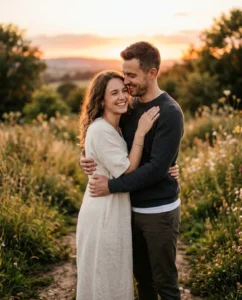
Prompt:
Create a realistic romantic couple portrait from the uploaded photo. Place the couple in a warm sunset outdoor setting with soft golden light, natural smiles, gentle body language and a clean blurred background. Keep the mood romantic, calm and elegant. Maintain natural skin tones, realistic clothing details and a polished photography look. Do not add text, watermark, extra people, distorted hands or unrealistic facial changes.
Customizable: sunset location, outfit colors, background, pose
2. Rainy Umbrella Couple Prompt
Best for: Emotional romantic edits
Aspect Ratio: 4:5
Test Status: not yet model-tested
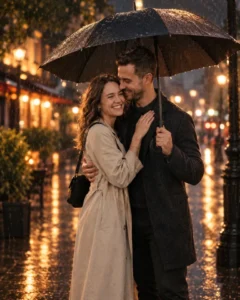
Prompt:
Turn the uploaded couple photo into a cinematic rainy evening scene. Show the couple standing close under one umbrella on a quiet street with soft reflections on the ground, warm city lights in the background and a romantic film-style atmosphere. Keep the couple looking natural and realistic. Preserve the main facial features as much as possible without making the image look artificial. No text, no logo, no extra fingers and no cartoon effect.
Customizable: city street, rain level, outfit style, lighting
3. Cafe Date Couple Photo Prompt
Best for: Cute and natural couple edits
Aspect Ratio: 4:5
Test Status: not yet model-tested
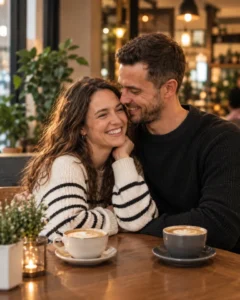
Prompt:
Create a realistic romantic cafe date photo using the uploaded couple image as reference. Place the couple sitting together at a cozy cafe table with warm indoor lighting, coffee cups, soft background blur and relaxed happy expressions. The scene should feel natural, modern and suitable for Instagram. Keep skin texture realistic and avoid over-smoothing. Do not change the couple into different people, and do not add text or watermark.
Customizable: cafe style, clothing, table props, lighting
4. Traditional Indian Couple Look
Best for: Festive or cultural romantic photos
Aspect Ratio: 4:5
Test Status: not yet model-tested
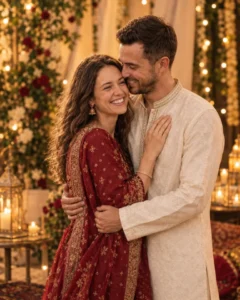
Prompt:
Edit the uploaded couple photo into a traditional Indian romantic portrait. Dress the couple in elegant ethnic outfits with warm festive lighting, soft decorative background, natural expressions and a graceful pose. The image should look like a clean professional photoshoot, not an over-edited poster. Keep the faces realistic and avoid heavy makeup changes. No text, no watermark, no unrealistic jewelry and no extra people.
Customizable: saree, kurta, lehenga, background decor, colors
5. Beach Walk Romantic Couple Prompt
Best for: Travel-style romantic edits
Aspect Ratio: 4:5
Test Status: not yet model-tested
Prompt:
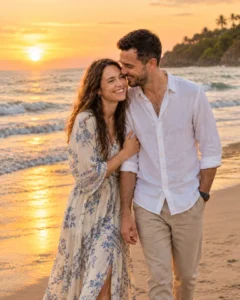
Create a romantic beach walk photo from the uploaded couple image. Show the couple walking together near the shoreline during golden hour, with soft waves, natural sunlight, relaxed expressions and a peaceful vacation mood. Keep the photo realistic with natural shadows and clean detail. The couple should look close and comfortable, without exaggerated poses. Avoid cartoon style, distorted faces, extra hands, text or watermark.
Customizable: beach, sunset, clothes, walking pose
6. Anniversary Couple Portrait
Best for: Love, anniversary and relationship posts
Aspect Ratio: 4:5
Test Status: not yet model-tested
Prompt:
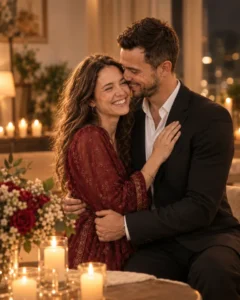
Transform the uploaded couple photo into an elegant anniversary-style portrait. Place the couple in a soft romantic indoor setting with warm lights, simple flowers, clean background blur and a happy natural pose. Keep the image realistic, premium and emotional without making it look artificial. Preserve the couple’s main appearance as much as possible. Do not add written text, numbers, balloons with text, watermark or unnatural facial changes.
Customizable: flowers, background, outfits, lighting
7. Cinematic Night Couple Prompt
Best for: Stylish romantic social media photos
Aspect Ratio: 4:5
Test Status: not yet model-tested

Prompt:
Create a cinematic night portrait of the couple from the uploaded photo. Place them in a modern outdoor night scene with soft street lights, warm bokeh, natural shadows and a romantic movie-like mood. The couple should stand close with relaxed expressions and realistic body posture. Keep the final image sharp, clean and natural. Avoid plastic skin, extra fingers, face swapping, text, watermark or unrealistic background objects.
Customizable: city lights, pose, outfit, background depth
8. Pre-Wedding Style Couple Prompt
Best for: Wedding or engagement-style edits
Aspect Ratio: 4:5
Test Status: not yet model-tested

Prompt:
Use the uploaded couple photo to create a realistic pre-wedding style portrait. Set the couple in a beautiful outdoor location with soft natural light, elegant outfits, romantic posing and a clean professional photography look. The image should feel graceful and emotional, with balanced colors and realistic details. Keep the couple’s facial features natural. Do not add text, watermark, extra people, distorted hands or fantasy effects.
Customizable: garden, palace, beach, outfits, pose
Tips to Get Better Couple AI Photo Results
Use a clear source image where both faces are visible. AI tools often struggle when the original photo is blurry, too dark or taken from an extreme angle.
Keep the prompt specific but not overloaded. A good romantic couple photo prompt should describe the couple, mood, background, lighting, pose and final style. Too many conflicting details can make the result look messy.
If the output changes the face too much, ask for a softer edit. You can write: “Make the result more natural and closer to the uploaded photo. Reduce face changes and keep realistic skin texture.”
If the hands look wrong, regenerate the image or add a correction line such as: “Keep hands natural, with correct fingers and relaxed poses.”
Common Mistakes to Avoid
Do not ask for exact identity preservation as a guaranteed result. AI tools can try to follow the reference image, but they may still change facial details.
Avoid adding too many props in one prompt. Flowers, lights, rain, pets, vehicles, text, jewelry and background people in the same prompt can create errors.
Do not use copyrighted photos, private photos or someone else’s image without permission. If you are making a couple edit from real people, use images you own or have permission to edit.
