



Baby birthday photos are special because they become family memories. With AI photo editing prompts, you can turn a simple baby photo into a cute birthday portrait with balloons, cake, soft studio lights, toys, pastel backgrounds and birthday wishes.
In this article, you will get copy-ready baby happy birthday AI photo editing prompts. Each prompt has a different image style, baby look, pose, scene and birthday mood, so the results do not look repetitive.
These prompts are written for ChatGPT image tools, Gemini and other AI photo editing tools that support prompt-based image editing. Results can vary depending on the uploaded photo, tool quality and source image.
Important Safety Note for Baby Photo Prompts
Use only safe, cute and age-appropriate baby styling. Avoid risky poses, unsafe props, heavy editing, glamour styling or anything that makes the baby look older than their age.
For better results, use a clear baby photo where the face is visible. Do not upload private child photos to tools you do not trust. Parents or guardians should decide where and how the final image is shared.
1. Cute Cake Smash Birthday Prompt
Best for: First birthday photo, cake smash edit, cute family memory

Prompt:
Create a cute baby birthday cake smash photo using the uploaded baby photo as the reference. Change the baby’s look into a soft pastel birthday outfit with a small birthday hat. Place the baby sitting safely on a clean soft mat in front of a small colorful cake. Add pastel balloons, soft studio lighting, gentle birthday decorations, realistic skin texture, natural baby smile and warm family-photo style. Add a simple “Happy Birthday” decoration in the background if the tool can render text clearly. Keep the baby age-appropriate, safe and natural. No watermark, no logo, no unsafe pose.
Recommended Aspect Ratio: 4:5
Customizable Elements: Outfit color, cake color, balloon theme, birthday age
Test Status: Not yet model-tested
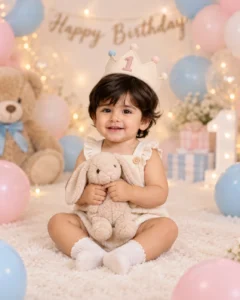
2. Pastel Balloon Birthday Prompt
Best for: Soft birthday portrait, Instagram post, WhatsApp status
Prompt:
Transform the uploaded baby photo into a pastel balloon birthday portrait. Change the baby’s look into a cute cream-colored romper with tiny socks and a soft birthday crown. Show the baby sitting safely in the center of a pastel studio setup, holding a small soft toy with both hands. Add pink, blue and white balloons, warm fairy lights, a soft birthday backdrop, natural baby expression, realistic shadows and professional baby photography style. Keep the scene clean, safe, cheerful and age-appropriate. No watermark, no logo.
Recommended Aspect Ratio: 4:5
Customizable Elements: Balloon colors, romper color, toy type, backdrop theme
Test Status: Not yet model-tested
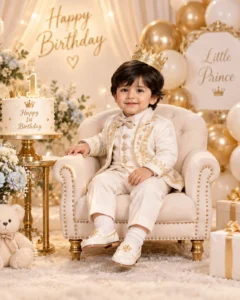
3. Royal Baby Birthday Prompt
Best for: Premium birthday edit, elegant card design, royal theme
Prompt:
Create a royal baby birthday portrait from the uploaded baby photo. Change the baby’s look into a cute soft royal-style outfit with a tiny golden crown and comfortable shoes. Place the baby sitting safely on a small cushioned chair in a luxury pastel birthday setup. Add gold and white balloons, a small birthday cake table, soft warm lighting, elegant background curtains, realistic baby face details and high-end studio photography color grading. Keep the baby natural, innocent and age-appropriate. No heavy makeup, no adult styling, no watermark.
Recommended Aspect Ratio: 4:5
Customizable Elements: Crown style, outfit color, balloon color, cake table
Test Status: Not yet model-tested
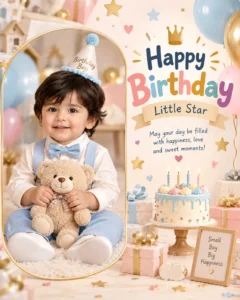
4. Baby Birthday Wishes Card Prompt
Best for: Birthday greeting card, family sharing, WhatsApp wishes
Prompt:
Create a cute baby happy birthday wishes card using the uploaded baby photo. Place the baby safely inside a soft rounded photo frame on the left side. Change the baby’s look into a simple birthday outfit with a cute smile and natural expression. On the right side, create a pastel birthday card layout with balloons, stars, cake icons and soft warm colors. Add clean readable text: “Happy Birthday, Little Star” if the AI tool can render text correctly. Keep the design cheerful, family-friendly, age-appropriate and clean. No watermark, no logo.
Recommended Aspect Ratio: 16:9 or 4:5
Customizable Elements: Wish text, frame shape, color theme, baby outfit
Test Status: Not yet model-tested
5. First Birthday Number One Prompt
Best for: First birthday, milestone photo, baby birthday poster

Prompt:
Edit the uploaded baby photo into a first birthday milestone portrait. Change the baby’s look into a cute soft birthday outfit with a tiny party hat. Place the baby sitting safely next to a large decorative number “1” prop, with a small cake and pastel balloons around. Add warm studio lighting, soft carpet, gentle birthday background, realistic baby skin texture, natural smile and professional photography style. Keep the pose safe and comfortable. No watermark, no logo, no unrealistic facial changes.
Recommended Aspect Ratio: 4:5
Customizable Elements: Number age, outfit color, cake style, balloon colors
Test Status: Not yet model-tested
6. Outdoor Garden Birthday Prompt
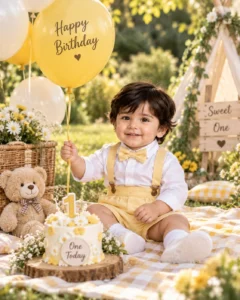
Best for: Natural birthday photo, outdoor family style, soft daylight edit
Prompt:
Create a cute outdoor garden birthday photo using the uploaded baby image. Change the baby’s look into a soft yellow birthday outfit with a small bow or birthday cap. Show the baby sitting safely on a picnic blanket in a green garden, holding a small toy or balloon string. Add a small cake basket, flowers, soft morning sunlight, natural shadows, blurred greenery and cheerful family-photo style. Keep the baby’s expression natural and the scene safe, calm and age-appropriate. No watermark, no logo.
Recommended Aspect Ratio: 4:5
Customizable Elements: Outfit color, flower type, picnic setup, sunlight tone
Test Status: Not yet model-tested
7. Twin Baby Birthday Prompt
Best for: Twins birthday edit, siblings birthday card, family album

Prompt:
Create a cute twin baby birthday portrait in a pastel studio setup. If two baby photos are uploaded, use both as references and keep each baby’s natural face details. Dress both babies in matching soft birthday outfits with different pastel colors. Place them sitting safely side by side on a soft mat, with a small cake between them, balloons behind them and warm studio lights. Add cheerful birthday decorations, natural baby expressions, realistic shadows and soft family photography style. Keep everything safe, modest and age-appropriate. No watermark, no logo.
Recommended Aspect Ratio: 4:5 or 16:9
Customizable Elements: Outfit colors, twin pose, cake placement, balloon theme
Test Status: Not yet model-tested
Ready Baby Birthday Wishes to Add
You can use these short wishes in your birthday design:
- Happy Birthday, Little Star!
- Wishing you a day full of smiles, cake and love.
- Happy Birthday to our sweetest little blessing.
- May your birthday be filled with joy, laughter and cuddles.
- One tiny smile, one big celebration. Happy Birthday!
- Happy Birthday, little angel. You make every day brighter.
- Sending lots of love and birthday hugs.
- Happy Birthday to the cutest little bundle of joy.
If the AI tool struggles with text, create the image without text first, then add the birthday wish manually in Canva, Photoshop or your WordPress image editor.
Best Customization Tips
Always mention the baby’s look, outfit, pose, scene and birthday style. Do not only say “make birthday photo.”
A stronger prompt should include:
- Baby look: birthday outfit, romper, tiny cap, soft crown
- Pose: sitting safely, holding toy, near cake, on soft mat
- Scene: pastel studio, garden, cake smash, greeting card
- Mood: cute, cheerful, soft, family-friendly
- Safety: safe pose, age-appropriate, no adult styling
Common Problems and Fixes
If the baby face changes too much, add:
“Keep the baby’s natural facial features and expression close to the uploaded photo without over-editing.”
If the baby looks older, add:
“Keep the baby age-appropriate and do not make the child look older.”
If the text is unreadable, add:
“Create the image without text and leave clean space for manual birthday wishes.”
If the hands look wrong, add:
“Keep baby hands natural, soft and realistically shaped.”
If the setup looks crowded, add:
“Use a clean pastel birthday setup with simple decorations and no extra people.”
Frequently Asked Questions
What is a baby happy birthday photo editing prompt?
It is a text instruction that tells an AI image tool to create or edit a baby birthday photo with cake, balloons, decorations, birthday wishes and a cute safe scene.
Can I use these prompts with my baby photo?
Yes. If your AI tool supports image upload, you can upload a clear baby photo and paste one of these prompts.
Which prompt is best for first birthday?
The first birthday number one prompt is best because it includes a number prop, cake, balloons and milestone birthday styling.
Can AI add birthday wishes text correctly?
Sometimes AI text may be misspelled or unclear. For clean results, generate the image first and add the birthday wish manually.
Are these prompts safe for kids content?
Yes, these prompts are written to be cute, modest, family-friendly and age-appropriate.
Are these prompts tested?
These prompts are not yet model-tested. They are original copy-ready prompts created for Prompt Seen, but results can vary by tool and source image quality.
Final Words
Baby birthday AI photo prompts work best when the prompt clearly describes the baby’s outfit, safe pose, birthday scene, decorations and wish style. Keep the design simple, cheerful and family-friendly.
For more safe child-focused prompt ideas, explore the Kids AI Prompts category on Prompt Seen.
