



Raksha Bandhan photos work best when they feel warm, simple, and real. A good AI prompt should not only say “make Raksha Bandhan photo.” It should describe the brother and sister, rakhi ceremony, outfits, home setting, lighting, emotions, and camera style.
These Raksha Bandhan AI photo editing prompts are made for ChatGPT image tools, Gemini, and similar AI photo editors. You can use them with a brother-sister photo, a family photo, or a reference portrait if your tool supports image upload.
The prompts below are original and not yet model-tested. Results can vary by tool, model version, source photo quality, and prompt details.
How to Use These Raksha Bandhan Prompts
Upload a clear photo if your AI tool supports image editing. A natural brother-sister photo works best. If you only have separate photos, use a prompt that says the final image should look like a believable family photo, but do not expect perfect identity matching.
Use 4:5 for Instagram posts, 9:16 for stories and WhatsApp status, and 16:9 for YouTube thumbnails or blog featured images.
Avoid fake claims like “keep face 100% same.” Instead, use “keep the people recognizable with natural facial structure and realistic skin texture.”
1. Classic Rakhi Ceremony Prompt
Best for: Main Raksha Bandhan post
Aspect Ratio: 4:5 or 9:16
Test Status: not yet model-tested
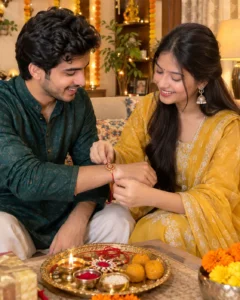
Prompt:
Create a realistic Raksha Bandhan photo of a sister tying rakhi on her brother’s wrist at home. Both are wearing elegant Indian festive outfits. Add a decorated thali with rakhi, rice, kumkum, sweets, and a small diya. Use warm indoor lighting, natural smiles, realistic skin texture, soft shadows, and a festive home background with marigold flowers. The image should look like a real family photograph, not a fantasy poster. No text, no watermark, no distorted hands, no extra fingers, no plastic skin.
Customize: outfit colors, home background, thali details, lighting mood.
2. Emotional Brother-Sister Portrait Prompt
Best for: Heartwarming Instagram photo
Aspect Ratio: 4:5
Test Status: not yet model-tested
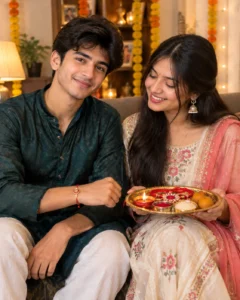
Prompt:
Create an emotional Raksha Bandhan portrait of a brother and sister sitting together after the rakhi ceremony. The brother is smiling softly while the sister holds the rakhi thali. Use warm golden light, simple festive decor, natural expressions, realistic clothing texture, and a soft blurred background. The mood should feel loving, calm, and family-oriented. Keep the photo realistic and natural, with believable skin tones and normal body proportions. No text, no watermark, no over-editing, no face distortion, no cartoon effect.
Customize: pose, background, outfit, expression.
3. Raksha Bandhan Family Photo Prompt
Best for: Family group image
Aspect Ratio: 16:9 or 4:5
Test Status: not yet model-tested

Prompt:
Create a realistic Raksha Bandhan family photo inside a decorated Indian home. Show a brother and sister at the center, with family members smiling around them. The sister has just tied rakhi, and the brother is holding a sweet. Add marigold garlands, diyas, warm festive lights, and a clean living room background. Use natural skin texture, realistic faces, balanced lighting, and a real DSLR family-photo look. Avoid fake smiles, extra limbs, distorted hands, text, watermark, and overly bright colors.
Customize: number of family members, room decor, outfit style, camera angle.
4. Long-Distance Raksha Bandhan Video Call Prompt
Best for: Emotional modern Rakhi concept
Aspect Ratio: 9:16 or 4:5
Test Status: not yet model-tested

Prompt:
Create a realistic emotional Raksha Bandhan scene where a sister celebrates with her brother through a video call because they are in different cities. Show the sister holding a rakhi thali near her phone or laptop screen, with the brother smiling on the video call. Add warm home lighting, simple festive decor, soft emotional mood, realistic screen glow, and natural details. The image should feel modern and heartfelt, not staged. No text, no watermark, no distorted screen, no broken hands, no fake UI, no plastic skin.
Customize: phone or laptop, background decor, outfit, emotional tone.
5. Rakhi Gift Moment Prompt
Best for: Sweet sibling memory photo
Aspect Ratio: 4:5
Test Status: not yet model-tested
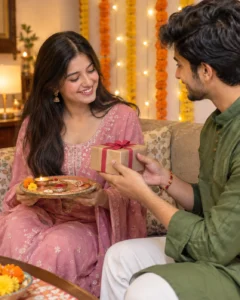
Prompt:
Create a realistic Raksha Bandhan photo showing a brother giving a small gift to his sister after she ties rakhi. The sister is smiling, holding the rakhi thali, and the brother is handing over a wrapped gift. Use festive Indian outfits, warm home lighting, soft bokeh, marigold decor, and natural skin texture. The scene should feel candid, simple, and emotional. Avoid luxury exaggeration, unrealistic jewelry, distorted fingers, text, watermark, and over-smoothed faces.
Customize: gift type, outfit colors, decor, pose.
6. Childhood Memory Raksha Bandhan Prompt
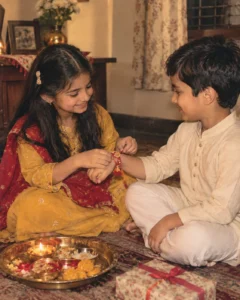
Best for: Nostalgic sibling edit
Aspect Ratio: 4:5 or 1:1
Test Status: not yet model-tested
Prompt:
Create a nostalgic Raksha Bandhan photo inspired by childhood sibling memories. Show a young brother and sister sitting together at home during the rakhi ceremony, with a simple thali, sweets, warm family lighting, and a soft vintage-photo feel. Use realistic expressions, natural skin texture, modest festive clothing, and a gentle family-album mood. The image should feel like an old memory, not a cartoon. No text, no watermark, no face distortion, no extra fingers, no unrealistic background.
Customize: age range, vintage tone, room style, outfit.
7. Polaroid Raksha Bandhan Collage Prompt
Best for: Instagram carousel or story
Aspect Ratio: 9:16 or 1:1
Test Status: not yet model-tested
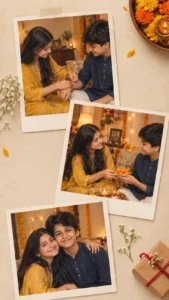
Prompt:
Create a Raksha Bandhan Polaroid-style collage showing three natural moments: sister tying rakhi, brother giving sweets, and both smiling together. Use warm festive colors, marigold flowers, diya lights, simple Indian home decor, and realistic photo texture. Each Polaroid should look like a real captured memory with soft film grain and natural expressions. Keep the layout clean and aesthetic. No readable text, no watermark, no distorted faces, no extra hands, no messy collage edges.
Customize: number of frames, color tone, moments, background.
8. Raksha Bandhan Festive Poster Prompt
Best for: Blog featured image or social post
Aspect Ratio: 16:9 or 4:5
Test Status: not yet model-tested
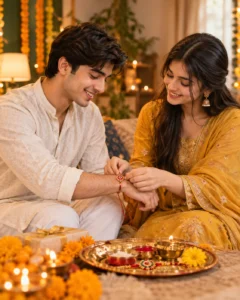
Prompt:
Create a cinematic Raksha Bandhan festive poster showing a brother and sister smiling during the rakhi ceremony. Add warm diya lights, marigold flowers, traditional outfits, a decorated rakhi thali, and a softly blurred festive home background. Use realistic portrait photography, balanced highlights, natural skin texture, and emotional sibling warmth. Keep the composition clean with space for optional text, but do not generate any text inside the image. No watermark, no extra fingers, no plastic skin, no cartoon style.
Customize: poster framing, outfit colors, background, lighting intensity.
Tips for Better Raksha Bandhan AI Photos
Use clear relationship details in the prompt. Mention brother, sister, rakhi, thali, sweets, diya, home decor, and festive clothing.
Hands are important in Raksha Bandhan photos because the rakhi ceremony focuses on the wrist. Add “realistic hands, natural fingers, accurate rakhi placement” in the prompt if your tool often makes hand errors.
Keep the setting simple. A decorated home, small thali, marigold flowers, and warm light are enough. If you add too many props, the photo can look messy.
For a more human result, ask for natural smiles, candid family-photo mood, realistic skin texture, and soft shadows.
Common Mistakes to Avoid
Do not ask the AI to create too many people unless needed. Group photos are harder and may create extra hands or distorted faces.
Do not add text inside the image. AI-generated festival text often looks broken or misspelled.
Do not use someone’s private family photo without permission. If you are editing real people, use only photos you are allowed to edit.
Do not overuse words like 8K, ultra-perfect, flawless, and 100% face same. These words can make the image look unnatural.
Frequently Asked Questions
What is a Raksha Bandhan AI photo editing prompt?
It is a text instruction used in AI photo tools to create or edit Raksha Bandhan images with brother, sister, rakhi, thali, sweets, diyas, and festive decor.
Can I use these prompts in ChatGPT or Gemini?
Yes. These prompts can be adapted for ChatGPT image tools, Gemini, and other AI photo editors that support image prompts.
Which prompt is best for Instagram?
The classic rakhi ceremony, emotional brother-sister portrait, and Polaroid collage prompts work best for Instagram posts and stories.
What aspect ratio should I use?
Use 4:5 for Instagram posts, 9:16 for stories and WhatsApp status, and 16:9 for featured images or thumbnails.
Can AI keep the same brother and sister faces?
It may keep them recognizable if you upload a clear photo, but exact face preservation is not guaranteed.
Which category should this article use?
Use Festival AI Prompts because Raksha Bandhan is a festival-led AI photo editing topic.
Final Note
Raksha Bandhan photos should feel warm and personal. Keep the prompt focused on the sibling bond, the rakhi ceremony, and realistic family details. This article belongs in Festival AI Prompts.
