



An aesthetic pixel art photo prompt helps turn a normal portrait into a retro game-style image. Instead of a realistic photo look, the final result uses visible square pixels, limited colors, clean outlines and a vintage 8-bit or 16-bit mood.
This style is useful for profile pictures, gaming avatars, Instagram edits, sticker-style portraits, retro wallpapers and creative social media posts. Pixel art does not always preserve tiny facial details perfectly because the style is intentionally simplified, so the prompt should focus on clear silhouette, hairstyle, outfit and key facial features.
For best results, upload a clear front-facing or half-body photo. Avoid blurry images because pixel art needs a clean subject shape before it can simplify the portrait into a readable avatar.
1. 16-Bit Aesthetic Pixel Portrait
Best for: Profile picture or avatar
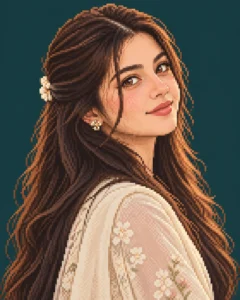
Prompt:
Transform the uploaded photo into an aesthetic 16-bit pixel art portrait of the girl. Keep her main facial features, hairstyle, outfit color and expression recognizable, but render everything with crisp square pixels, clean hard edges, limited 32-color pastel palette and soft dithered shading. Use head-and-shoulders framing, subtle pixel highlights in the eyes, smooth pixel hair detail and a simple dark teal background. Make it look like a retro RPG character portrait. Avoid realistic photo texture, blurry pixels, messy outlines, text, logo and watermark.
Recommended aspect ratio: 4:5
Customizable elements: Background color, outfit color, palette, expression
Test status: Not yet model-tested
2. 8-Bit Retro Avatar Prompt
Best for: Cute gaming avatar

Prompt:
Convert the uploaded photo into a chunky 8-bit retro avatar of the girl. Use large visible square pixels, thick black outlines, bold flat colors, simple facial details and a strict 8-color palette. Keep the hairstyle, face shape and main outfit color easy to recognize. Use a clean solid background and centered head-and-shoulders framing. The result should look like an old 1980s arcade game avatar. Avoid smooth gradients, realistic skin texture, tiny unreadable details, text and watermark.
Recommended aspect ratio: 1:1
Customizable elements: Background color, outline thickness, color palette, outfit
Test status: Not yet model-tested
3. Cozy Room Pixel Art Portrait
Best for: Aesthetic social media edit
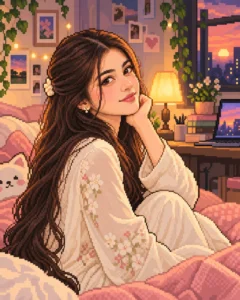
Prompt:
Create a cozy pixel art portrait of the girl from the reference photo sitting in a small warm bedroom. Render the scene in 16-bit pixel art style with soft pastel colors, clean square pixels, warm lamp light, tiny pixel decor, soft blanket, simple desk and cute wall art in the background. Keep the girl’s hairstyle, outfit color and expression recognizable while simplifying facial details into readable pixel art. Use gentle dithering and retro game atmosphere. Avoid messy background, unreadable face, text, logos and watermark.
Recommended aspect ratio: 4:5
Customizable elements: Room color, outfit, lamp light, decor style
Test status: Not yet model-tested
4. Cyberpunk Pixel Portrait
Best for: Dark neon avatar
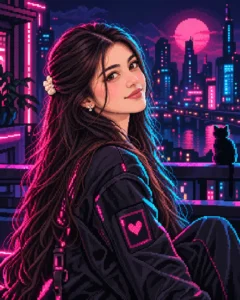
Prompt:
Transform the uploaded photo into a cyberpunk 16-bit pixel portrait of the girl. Keep her face shape, hairstyle and main expression recognizable, but render the image with crisp pixel blocks, neon pink and cyan rim lighting, dark city background, glowing pixel lights and limited neon color palette. Add a stylish jacket, subtle futuristic accessories and clean pixel highlights in the eyes. The result should feel like a retro sci-fi game character. Avoid over-bright neon, unreadable face, realistic photo texture, text and watermark.
Recommended aspect ratio: 4:5 or 1:1
Customizable elements: Neon color, jacket style, background city, accessories
Test status: Not yet model-tested
5. Fantasy RPG Pixel Sprite Prompt
Best for: Game character style
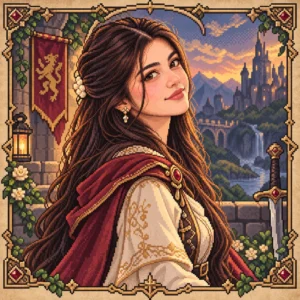
Prompt:
Turn the uploaded photo into a fantasy RPG pixel art character portrait of the girl. Keep her hairstyle and expression recognizable while adding a soft fantasy outfit, small cloak, simple jewelry and decorative pixel frame. Use 16-bit game style, crisp square pixels, warm 32-color palette, dithered shading, clean outlines and a parchment-style background. Make it look like a character selection screen from a retro RPG. Avoid realistic photo texture, distorted face, over-detailed background, text and watermark.
Recommended aspect ratio: 1:1
Customizable elements: Outfit class, cloak color, jewelry, frame style
Test status: Not yet model-tested
6. Cute Pastel Pixel Art Prompt
Best for: Soft feminine avatar

Prompt:
Create a cute pastel pixel art portrait of the girl from the uploaded photo. Use soft pink, lavender, cream and light blue colors, clean square pixels, simple facial features, glossy pixel eyes, smooth blocky hair and a gentle smile. Keep the portrait readable and aesthetic with head-and-shoulders framing and a simple pastel background. The style should feel like a cute retro handheld game avatar. Avoid realistic skin texture, harsh outlines, messy colors, text, logo and watermark.
Recommended aspect ratio: 1:1
Customizable elements: Pastel palette, smile level, hair style, background
Test status: Not yet model-tested
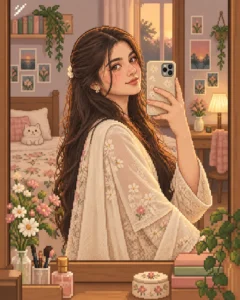
7. Pixel Art Mirror Selfie Prompt
Best for: Modern photo-to-pixel edit
Prompt:
Convert the uploaded mirror selfie into a stylish pixel art mirror selfie. Keep the mirror composition, phone position, hairstyle, outfit color and pose recognizable, but render the whole scene in crisp 16-bit pixel art style. Add clean blocky room details, simple pixel shadows, limited color palette and subtle highlights on the mirror edges. Make the image look like a retro life-simulation game scene. Avoid warped mirror, unreadable phone shape, messy room details, text and watermark.
Recommended aspect ratio: 4:5
Customizable elements: Room style, outfit, phone color, background palette
Test status: Not yet model-tested
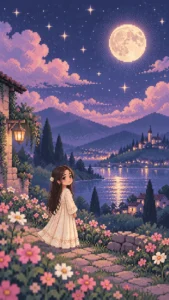
8. Pixel Art Wallpaper Scene
Best for: Lock screen or wallpaper
Prompt:
Create an aesthetic pixel art wallpaper scene inspired by the uploaded photo. Show the girl as a small 16-bit pixel character standing under a dreamy night sky with stars, soft clouds, glowing moonlight and pastel landscape background. Keep her outfit color and hairstyle recognizable while making the full scene feel like a retro indie game wallpaper. Use crisp square pixels, limited color palette, gentle dithering and clean composition. Avoid blurry pixels, cluttered background, text and watermark.
Recommended aspect ratio: 9:16
Customizable elements: Night sky, outfit, landscape, moonlight color
Test status: Not yet model-tested
How to Use These Pixel Art Prompts
- Upload a clear portrait or selfie.
- Copy one pixel art prompt from above.
- Paste it into your AI image editing tool.
- If the face becomes unreadable, ask for “larger facial features and clearer pixel eyes.”
- If the image looks too smooth, ask for “crisp square pixels and no anti-aliasing.”
- Generate more than one version because pixel art often needs a few attempts.
Customization Tips
For a cute profile picture, use the pastel pixel art prompt.
For gaming style, use the 8-bit avatar or fantasy RPG sprite prompt.
For dark Instagram style, use the cyberpunk pixel portrait prompt.
For wallpaper, use the pixel art wallpaper scene in 9:16 ratio.
Common Problems and Fixes
If the result looks blurry, add: “sharp pixel edges, no blur, no smooth gradients.”
If the face is not readable, add: “larger eyes, simple face shape, clear hairstyle and centered portrait framing.”
If it looks like normal illustration instead of pixel art, add: “visible square pixels, limited color palette, retro game sprite style.”
If the background is too busy, add: “simple background with clean pixel blocks.”
If identity changes too much, add: “keep hairstyle, outfit color and main facial structure recognizable.”
Frequently Asked Questions
What is an aesthetic pixel art photo prompt?
It is a copy-paste AI prompt that turns a normal photo into a retro pixel art style image with visible square pixels, limited colors and game-style details.
Can I use these prompts in ChatGPT?
Yes, you can use them in ChatGPT image editing if your account supports image upload and image generation.
What is better, 8-bit or 16-bit pixel art?
8-bit is simpler and chunkier, while 16-bit gives more detail, softer shading and better portrait readability.
Can pixel art preserve my exact face?
Not exactly. Pixel art simplifies the face, so it can keep major features like hairstyle, outfit color and expression, but tiny facial details may change.
Which prompt is best for a profile picture?
The 16-bit aesthetic pixel portrait and cute pastel pixel art prompt are best for profile pictures.
Are these prompts tested?
These prompts are not yet model-tested. Results can vary depending on the photo quality, AI tool, model version and settings.
Final Words
Aesthetic pixel art prompts are best when you want a creative retro look instead of a realistic portrait. Start with the 16-bit aesthetic pixel portrait if you want a clear avatar, or use the fantasy RPG sprite prompt if you want a game-character style result.
For more creative portrait ideas, explore the Girls AI Prompts category on Prompt Seen.
