



Cinematic beach photo edits are perfect for creating soft, stylish and Instagram-ready portraits. A simple photo can look completely different when the AI changes the scene, outfit, pose, lighting and overall photo style together.
In this article, you will get copy-ready cinematic beach AI photo editing prompts for girls. Each prompt has a different visual style, outfit look, pose and mood, so the results do not look repetitive.
You can use these prompts in ChatGPT image tools, Gemini or other AI photo editing tools that support image generation or image editing. Results may vary depending on the uploaded photo, image quality, AI model and prompt details.
How to Use These Prompts
Upload a clear photo where the face and body are visible. Then copy one prompt and paste it into your AI tool.
For better results, choose the prompt according to the style you want: soft sunset, tropical fashion, candid walk, rainy mood, close-up portrait, traditional saree, night beach or wallpaper style.
If the result changes the face too much, add:
“Keep the original facial features natural and avoid changing the identity too much.”
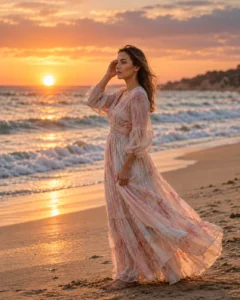
1. Golden Hour Beach Portrait Prompt
Best for: Instagram post, profile picture, soft cinematic look
Prompt:
Create a cinematic golden hour beach portrait of the girl from the uploaded photo. Change her look into an elegant pastel beach dress with soft flowing fabric and natural light makeup. Place her standing safely on dry sand near gentle ocean waves, with one hand lightly holding the dress and the other hand touching her hair. Use a relaxed side-facing pose, warm sunset light, wind in hair, soft ocean background blur, realistic shadows, natural skin texture and DSLR-style cinematic color grading. Keep the face natural and realistic from the reference photo. No text, no watermark, no logo.
Recommended Aspect Ratio: 4:5
Customizable Elements: Dress color, hand pose, sunset intensity, wave distance
Test Status: Not yet model-tested
2. Tropical Vacation Beach Prompt
Best for: Bright summer edit, travel photo, fresh beach look

Prompt:
Transform the uploaded photo into a tropical vacation-style beach portrait. Change the girl’s look into a light floral summer dress, simple sandals and soft beach waves hairstyle. Show her walking barefoot on clean white sand while looking slightly away from the camera with a natural smile. Add turquoise ocean water, palm trees in the background, clear daylight, soft shadows, bright travel photography colors and realistic skin texture. The photo should look like a candid vacation shot captured on a professional camera. No text, no watermark, no extra people.
Recommended Aspect Ratio: 4:5
Customizable Elements: Floral dress color, hairstyle, walking direction, palm background
Test Status: Not yet model-tested
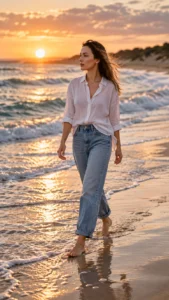
3. Candid Shoreline Walking Prompt
Best for: Natural lifestyle edit, Instagram reel cover, candid pose
Prompt:
Create a candid cinematic shoreline photo of the girl from the uploaded image. Change her style into a casual white shirt with light blue denim jeans and minimal accessories. Show her walking along the shoreline with one foot near the water, hair moving naturally in the wind, face turned slightly toward the ocean and hands relaxed at her sides. Add wet sand reflections, soft waves, warm daylight, natural body movement, realistic fabric folds and lifestyle photography color grading. Avoid stiff pose, distorted hands, extra limbs, text and watermark.
Recommended Aspect Ratio: 4:5 or 9:16
Customizable Elements: Shirt color, denim style, walking pose, wave distance
Test Status: Not yet model-tested
4. Rainy Beach Cinematic Prompt
Best for: Emotional portrait, moody beach edit, dramatic social post

Prompt:
Edit the uploaded photo into a cinematic rainy beach portrait. Change the girl’s look into a modest dark long coat over a simple outfit, with slightly wet hair and a calm emotional expression. Place her standing safely on wet sand, holding one hand near the collar of the coat while looking down gently. Add light rain, cloudy sky, soft ocean waves, misty background, wet sand reflections, muted blue-gray color grading and realistic raindrops. Keep the face visible and natural with realistic skin texture. No text, no watermark, no face distortion.
Recommended Aspect Ratio: 4:5
Customizable Elements: Coat color, rain level, expression, sky tone
Test Status: Not yet model-tested
5. Close-Up Beach Beauty Portrait Prompt
Best for: Profile photo, soft beauty portrait, close-up cinematic look

Prompt:
Create a realistic cinematic close-up beach portrait of the girl from the uploaded photo. Change her look into a clean natural beauty style with soft makeup, small earrings and loose wind-blown hair. Frame her from the shoulders up, with her face turned slightly toward the camera and one hand gently adjusting her hair. Add warm beach sunlight on the face, blurred ocean background, shallow depth of field, realistic skin texture, expressive eyes, soft highlights and premium editorial color grading. Avoid plastic skin, fake eyes, over-beautification, text and watermark.
Recommended Aspect Ratio: 1:1 or 4:5
Customizable Elements: Makeup level, jewelry, face angle, background blur
Test Status: Not yet model-tested
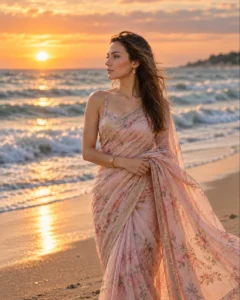
6. Elegant Beach Saree Prompt
Best for: Indian aesthetic edit, graceful portrait, traditional look
Prompt:
Create an elegant cinematic beach portrait of the girl wearing a flowing saree near the ocean during sunset. Change her look into a soft pastel saree with light jewelry and natural makeup. Show her standing sideways on dry sand, one hand holding the saree pallu naturally while the other hand rests near her waist. Add warm golden light, ocean waves behind her, soft wind moving the saree fabric, realistic shadows, graceful expression and premium DSLR photography style. Keep the result modest, realistic and cinematic. No text, no watermark, no extra people.
Recommended Aspect Ratio: 4:5
Customizable Elements: Saree color, jewelry style, pose, sunset tone
Test Status: Not yet model-tested
7. Night Beach Lights Prompt
Best for: Dreamy night edit, unique Instagram photo, reel cover

Prompt:
Turn the uploaded photo into a cinematic night beach portrait. Change the girl’s look into a stylish black evening outfit with soft wavy hair and minimal jewelry. Place her sitting safely on a clean beach bench or low wooden platform near the sand, with one leg slightly angled and hands resting naturally. Add moonlight, soft decorative lights in the background, gentle ocean waves, warm bokeh, dark blue color grading, realistic face details and balanced lighting so the subject remains clearly visible. No horror mood, no text, no watermark, no extra people.
Recommended Aspect Ratio: 4:5 or 9:16
Customizable Elements: Outfit color, sitting pose, light color, background distance
Test Status: Not yet model-tested
Best Customization Tips
If you want the photo to look more premium, do not only change the background. Always mention the outfit, hairstyle, pose, lighting and camera style.
A better prompt should include:
- Image style: cinematic, candid, editorial, travel, rainy, close-up
- Look change: dress, saree, casual outfit, evening outfit
- Pose change: walking, standing sideways, sitting, hair-touch pose
- Scene mood: sunset, daylight, rainy, night lights, tropical
- Realism control: natural face, realistic skin texture, correct shadows
This makes every prompt more useful and less repetitive.
Common Problems and Fixes
If the face changes too much, add:
“Keep the original facial features natural and avoid changing the identity too much.”
If the pose looks stiff, add:
“Use a natural candid pose with relaxed body posture.”
If the beach looks fake, add:
“Use realistic sand texture, natural waves and correct lighting perspective.”
If the outfit looks unnatural, add:
“Use realistic fabric folds and believable clothing details.”
If the image becomes too polished, add:
“Keep natural skin texture and avoid plastic-looking skin.”
Frequently Asked Questions
What is a cinematic beach photo prompt for girls?
It is a text instruction that tells an AI image tool to create or edit a girl’s portrait with beach background, cinematic lighting, outfit styling, pose and mood.
Why should every prompt include look and pose changes?
Because changing only the background creates repetitive results. A strong prompt changes the outfit, hairstyle, pose, lighting and camera style together.
Can I use these prompts with my own photo?
Yes. Upload a clear reference photo, then paste one of the prompts into your AI photo editing tool.
Which beach prompt is best for Instagram?
The golden hour beach portrait and candid shoreline walking prompt are best for Instagram because they look natural and stylish.
Can AI keep the face exactly the same?
No AI tool can guarantee exact face preservation every time. A clear reference photo and detailed prompt can improve results, but output may still vary.
What aspect ratio should I use?
Use 4:5 for Instagram posts, 9:16 for reels or stories, 1:1 for profile pictures and 16:9 for featured images or wallpapers.
