



An ultra realistic sunset river photo prompt is used to create a cinematic portrait near water during golden hour. This style usually includes a warm sunset sky, glowing river reflections, soft wind, natural skin texture, peaceful mood and a DSLR-style portrait look.
This type of prompt works well for Instagram posts, profile pictures, reel covers, aesthetic wallpapers and soft outdoor portraits. The sunset and river background adds emotion, while the golden light makes the photo look warm and cinematic.
For best results, upload a clear portrait or half-body photo. A photo with good face visibility works better than a blurry selfie because the AI needs enough detail to build a realistic sunset scene around the subject.
Best Ultra Realistic Sunset River AI Photo Editing Prompts
1. Golden Hour River Portrait
Best for: Clean cinematic portrait
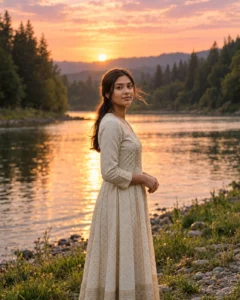
Prompt:
Create an ultra-realistic cinematic portrait of the girl from the uploaded photo standing beside a calm river during golden hour. Add warm orange sunlight, soft pink sky, glowing water reflections, natural wind in her hair, realistic skin texture, detailed eyes and an elegant outfit. Use shallow depth of field, soft background blur and DSLR-style photography. Keep the face natural and clear. Avoid plastic skin, distorted hands, fake water reflection, harsh HDR, text, logo and watermark.
Recommended aspect ratio: 4:5
Customizable elements: Outfit color, sunset intensity, river background, expression
Test status: Not yet model-tested
2. Riverside Walking Moment Prompt
Best for: Natural lifestyle photo
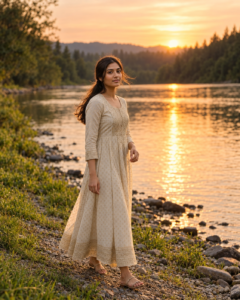
Prompt:
Edit the uploaded photo into a realistic riverside walking portrait. Show the girl walking slowly near the riverbank during sunset, with warm sunlight on her face, soft breeze, natural hair movement, glowing water in the background and a calm peaceful expression. Add realistic shadows, soft color grading and cinematic depth of field. The image should look like a natural outdoor photoshoot. Avoid unrealistic pose, distorted feet, fake background, blurry face, text and watermark.
Recommended aspect ratio: 4:5 or 9:16
Customizable elements: Walking pose, outfit, riverbank, sunset color
Test status: Not yet model-tested
3. Sunset River Boat Portrait
Best for: Dreamy aesthetic photo
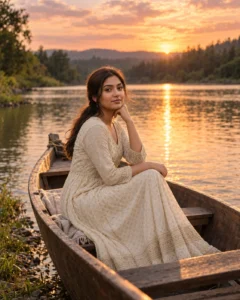
Prompt:
Create an ultra-realistic sunset river portrait of the girl sitting safely in a small wooden boat near the riverbank. Add warm golden sunlight, soft orange-pink clouds, water reflections, gentle ripples, natural face detail, realistic outfit texture and peaceful cinematic mood. Keep the pose simple and graceful, with the face clearly visible. Use professional DSLR photo quality and soft background blur. Avoid unsafe boat position, fantasy water, distorted hands, text and watermark.
Recommended aspect ratio: 4:5
Customizable elements: Boat style, outfit, sky color, water reflection
Test status: Not yet model-tested
4. Sunset River Silhouette Prompt
Best for: Wallpaper or emotional photo

Prompt:
Transform the uploaded photo into a cinematic sunset river silhouette portrait. Show the girl standing near the river with the glowing sunset behind her, soft golden outline around her hair and shoulders, calm water reflections, peaceful sky and gentle cinematic atmosphere. Keep enough facial and outfit detail visible so the subject does not become fully black. Use warm film-style color grading and realistic lighting. Avoid completely hidden face, fake sun shape, messy background, text and watermark.
Recommended aspect ratio: 9:16 or 4:5
Customizable elements: Silhouette strength, sun position, outfit, sky tone
Test status: Not yet model-tested
5. River Reflection Close-Up Portrait
Best for: Profile picture

Prompt:
Create a close-up cinematic portrait of the girl near a sunset river. Keep her face sharp, eyes detailed, skin realistic and expression calm. Add warm golden light on one side of the face, soft river reflection bokeh in the background, gentle wind in hair and natural outdoor color grading. The background should show blurred water highlights and orange-pink sunset tones. Avoid over-smoothing, face distortion, fake bokeh, text, logo and watermark.
Recommended aspect ratio: 1:1 or 4:5
Customizable elements: Face angle, background blur, light warmth, expression
Test status: Not yet model-tested
6. Traditional Outfit River Sunset Prompt
Best for: Elegant cultural portrait

Prompt:
Create an ultra-realistic cinematic portrait of the girl wearing an elegant traditional outfit beside a calm river at sunset. Add golden-hour sunlight, soft orange sky, realistic fabric details, subtle jewelry, natural skin texture, graceful pose and glowing water reflections. Keep the mood respectful, peaceful and premium. Use DSLR-style portrait quality with shallow depth of field. Avoid fake jewelry, distorted hands, excessive makeup, text and watermark.
Recommended aspect ratio: 4:5
Customizable elements: Saree, lehenga, shalwar kameez, jewelry, sky color
Test status: Not yet model-tested
7. Rainy Sunset River Prompt
Best for: Moody cinematic edit

Prompt:
Edit the uploaded image into a realistic rainy sunset river portrait. Show the girl standing safely near the riverbank with light rain, orange sunset glow, wet ground reflections, soft cloudy sky, natural skin texture and calm emotional expression. Add gentle raindrops, realistic water ripples and cinematic color grading. Keep the face visible and natural. Avoid unsafe river edge, heavy storm, fake rain, distorted hands, text and watermark.
Recommended aspect ratio: 4:5
Customizable elements: Rain level, outfit, sky mood, reflection strength
Test status: Not yet model-tested
8. Wide Cinematic River Scene Prompt
Best for: Featured image or wallpaper

Prompt:
Create a wide cinematic sunset river scene featuring the girl standing on a safe riverbank, with a large glowing sky, calm water reflections, soft clouds, warm orange-pink tones and peaceful landscape depth. Keep the subject realistic and clearly visible, with natural outfit details, realistic face, soft wind in hair and balanced composition. Use premium travel photography style with natural shadows and cinematic grading. Avoid tiny unreadable face, fake landscape, text, logos and watermark.
Recommended aspect ratio: 4:5
Customizable elements: Landscape, outfit, sky color, subject size
Test status: Not yet model-tested
How to Use These Prompts
- Upload a clear portrait or half-body photo.
- Copy one sunset river prompt from this article.
- Paste it into your AI photo editing tool.
- If the face changes too much, ask for natural facial consistency.
- If the river looks fake, ask for realistic water reflections and natural ripples.
- Check face, hands, outfit, water edges and background before publishing.
Customization Tips
For a soft Instagram portrait, use golden-hour river portrait or river reflection close-up.
For a wallpaper look, use the sunset silhouette or wide cinematic river scene.
For a dreamy aesthetic photo, use the boat portrait prompt.
For a more emotional look, use rainy sunset river with soft light rain and cloudy sky.
Common Problems and Fixes
If the sunset looks too artificial, add: “natural golden-hour lighting, balanced exposure and realistic sky colors.”
If the water reflection looks fake, add: “realistic river reflections, soft ripples and correct light direction.”
If the face becomes too dark, add: “keep the face clearly visible with soft warm light.”
If the background overwhelms the subject, add: “subject in clear focus, background softly blurred.”
If hands are distorted, use close-up framing or add: “hands relaxed and natural.”
Frequently Asked Questions
What is an ultra realistic sunset river photo prompt?
It is a copy-paste AI instruction that creates a realistic sunset river portrait with golden-hour light, water reflections and cinematic outdoor mood.
Can I use these prompts in ChatGPT?
Yes, you can use them in ChatGPT image editing if your account supports image upload and image generation.
Which prompt is best for Instagram?
The golden-hour river portrait and river reflection close-up prompts are best for Instagram posts and profile pictures.
Can I use these prompts for boys too?
Yes. Replace “girl” with “boy” or “man” depending on the uploaded photo.
Why does the river background sometimes look fake?
AI tools may create unrealistic reflections if the prompt is too vague. Add clear instructions for natural ripples, correct light direction and realistic water reflection.
Are these prompts tested?
These prompts are not yet model-tested. Results can vary depending on the uploaded photo, AI tool, model version and editing settings.
Final Words
Sunset river prompts are best when you want a peaceful, cinematic and warm outdoor photo edit. Start with the golden-hour river portrait for a clean result, or use the wide cinematic river scene if you need a featured image or wallpaper-style output.
For more outdoor portrait ideas, explore the Girls AI Prompts category on Prompt Seen.
