



A candlelight girl AI photo editing prompt is used to create a warm, cinematic portrait with soft golden light, deep shadows, natural skin texture, and a calm emotional mood. This style works well for close-up portraits, festive edits, profile pictures, dark-room photography looks, and dramatic Instagram posts.
The main thing is balance. If the candlelight is too strong, the face can look overexposed. If the background is too dark, the photo can lose detail. A good prompt should describe the candle, face lighting, shadows, background, skin texture, and mood clearly.
These prompts are written for ChatGPT image tools, Gemini, and similar AI photo editors. They are original and not yet model-tested.
How to Use These Candlelight Prompts
Upload a clear portrait photo if your AI tool supports image editing. A close-up or half-body photo works best. The face should be visible, the image should not be blurry, and the lighting should not already be too harsh.
Copy one prompt from below, paste it into your AI tool, and adjust the outfit, background, candle type, or mood. Use a vertical aspect ratio like 9:16 for stories and 4:5 for Instagram posts.
Do not ask for guaranteed exact face preservation. AI tools may keep the person recognizable, but exact identity is not guaranteed. Use wording like “keep the person recognizable with natural facial structure and realistic skin texture.”
1. Classic Candlelight Portrait Prompt
Best for: Soft cinematic portrait
Aspect Ratio: 4:5 or 9:16
Test Status: not yet model-tested
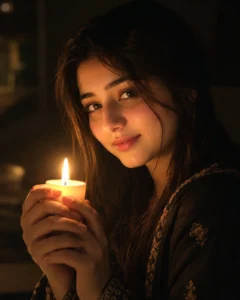
Prompt:
Create a realistic candlelight portrait of a young woman holding a small glowing candle near her face. Use warm golden light from the candle as the main light source, soft shadows on the cheeks, natural skin texture, realistic eyes, and a dark blurred background. The mood should feel calm, emotional, and cinematic. Keep the person recognizable with natural facial structure and believable details. Avoid plastic skin, overexposed highlights, distorted face, extra fingers, text, watermark, and cartoon effect.
Customize: candle size, outfit color, background darkness, expression.
2. Diya Candlelight Girl Prompt
Best for: Indian festive-style portrait
Aspect Ratio: 9:16 vertical
Test Status: not yet model-tested
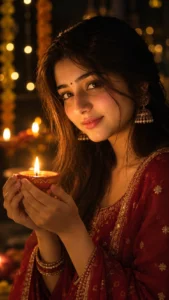
Prompt:
Transform the uploaded photo into a warm cinematic portrait of a young woman holding a glowing diya in her hands. The diya should cast soft golden light on her face, hands, and outfit. Use a dark festive background with subtle bokeh lights, realistic skin texture, gentle shadows, and natural eye reflections. The mood should feel peaceful and elegant, not overly edited. Keep the person recognizable and the lighting believable. No text, no watermark, no fake jewelry distortion, no extra fingers, no harsh HDR, no plastic skin.
Customize: outfit style, diya position, background lights, jewelry detail.
3. Close-Up Candlelight Eyes Prompt
Best for: Dramatic profile photo
Aspect Ratio: 4:5
Test Status: not yet model-tested
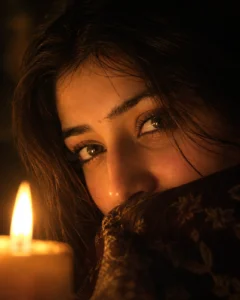
Prompt:
Create a close-up candlelight portrait focused on the eyes of a young woman. Use warm candle glow reflected softly in the eyes, natural skin texture, soft shadows around the face, and a dark blurred background. The expression should feel thoughtful and calm. Keep details realistic, with fine hair strands, natural eyelashes, and balanced low-light exposure. Avoid over-sharpening, fake eye color, distorted face, plastic skin, text, watermark, and unrealistic glow.
Customize: eye focus, hair framing, candle position, shadow level.
4. Vintage Candle Room Prompt
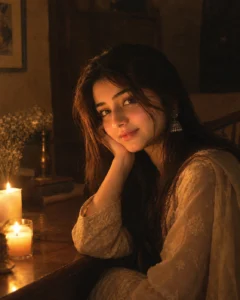
Best for: Old-photo cinematic mood
Aspect Ratio: 4:5 or 9:16
Test Status: not yet model-tested
Prompt:
Create a vintage candlelit room portrait of a young woman sitting near a small wooden table with candles. Use warm amber light, soft film grain, dark brown background tones, realistic fabric texture, and gentle shadows across the face. The image should feel like a real low-light photograph, not a fantasy painting. Keep the pose relaxed and natural, with believable skin tones and soft hair details. No text, no watermark, no extra limbs, no waxy skin, no cartoon style, no unrealistic candle flames.
Customize: room style, outfit, candle count, film grain strength.
5. Soft Black Dress Candlelight Prompt
Best for: Elegant Instagram portrait
Aspect Ratio: 9:16 vertical
Test Status: not yet model-tested

Prompt:
Create an elegant candlelight portrait of a young woman wearing a simple black dress in a dark indoor setting. Add warm golden light from candles placed near the lower side of the frame, soft highlights on the face and hair, realistic shadows, and natural skin texture. The pose should feel graceful and calm, with a cinematic low-light mood. Keep the background simple and blurred. Avoid heavy beauty retouching, unnatural body shape, overexposed candle flames, text, watermark, and distorted hands.
Customize: dress color, candle placement, background, pose.
6. Candlelight Window Portrait Prompt
Best for: Soft emotional portrait
Aspect Ratio: 4:5
Test Status: not yet model-tested
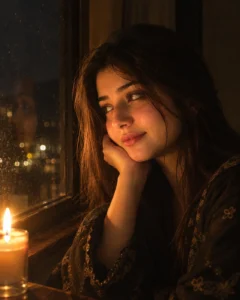
Prompt:
Create a realistic candlelight portrait of a young woman sitting near a window at night. A small candle should softly illuminate her face from one side, while the window background stays dark and slightly blurred. Use warm golden highlights, soft shadows, natural skin texture, and a peaceful expression. The image should feel quiet, intimate, and cinematic. Keep the reflection and lighting natural. No text, no watermark, no harsh contrast, no face distortion, no plastic skin, no fantasy glow.
Customize: window background, candle position, outfit, expression.
7. Candlelight Flower Portrait Prompt
Best for: Romantic aesthetic edit
Aspect Ratio: 9:16 vertical
Test Status: not yet model-tested

Prompt:
Create a dreamy candlelight portrait of a young woman with soft flowers around the background. Use warm candle glow, gentle floral bokeh, natural skin texture, soft hair details, and a calm expression. The candlelight should highlight the face softly without washing out the features. The background should stay elegant and slightly dark, with warm pink and gold tones. No text, no watermark, no extra fingers, no fake flower overload, no unrealistic face changes, no cartoon effect.
Customize: flower color, outfit, candle brightness, background tone.
8. Minimal Candlelight Selfie Prompt
Best for: Simple profile photo
Aspect Ratio: 1:1 or 4:5
Test Status: not yet model-tested
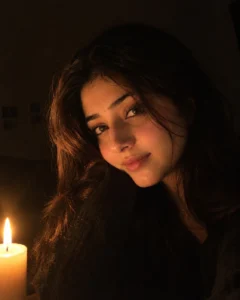
Prompt:
Create a minimal realistic candlelight selfie of a young woman in a dark room. Use one candle as the warm light source, soft shadows, natural skin texture, realistic phone-camera detail, and a simple uncluttered background. The image should look like a real low-light selfie with a soft cinematic mood. Keep the person recognizable and natural. Avoid heavy filters, over-smoothing, overexposed candle flame, distorted face, text, watermark, and fake glossy skin.
Customize: selfie crop, candle distance, background, mood.
Tips for Better Candlelight Results
Use words like warm golden light, soft shadows, low-light portrait, realistic skin texture, dark blurred background, candle glow, and natural eye reflections. These details help the AI understand the lighting style.
Keep the background simple. Candlelight works best when the scene is not crowded. A dark room, window, table, flowers, or festive bokeh is enough.
If the face becomes too dark, add “balanced low-light exposure.” If the candle looks too bright, add “soft candle flame, not overexposed.”
For a more natural image, avoid asking for flawless skin. Real candlelight should show soft texture, gentle shadows, and small imperfections.
Common Mistakes to Avoid
Do not use too many candles unless you want a dramatic fantasy look. Too many light sources can make the image messy.
Do not ask the AI to keep the face 100% identical. That is not guaranteed and often makes prompts sound unnatural. Ask for a recognizable person with natural facial structure instead.
Do not add text inside the image. AI-generated text can come out broken or misspelled.
Do not use copyrighted logos, celebrity names, or someone else’s private photo without permission.
Frequently Asked Questions
What is a candlelight girl AI photo editing prompt?
It is a prompt that turns a girl portrait into a warm candlelit photo with golden light, soft shadows, dark background, and cinematic mood.
Can I use these prompts in ChatGPT or Gemini?
Yes. You can use them in ChatGPT image tools, Gemini, and other AI photo editors that accept text prompts or reference photos.
Which aspect ratio is best for candlelight portraits?
Use 4:5 for Instagram posts and 9:16 for stories or full-screen portrait edits.
How do I make the candlelight look realistic?
Mention warm golden light, soft candle flame, natural shadows, realistic skin texture, and balanced low-light exposure.
Can this prompt keep the same face?
It may keep the person recognizable, but exact face preservation is not guaranteed. Use a clear source photo for better results.
Which prompt is best for Indian festive edits?
The diya candlelight girl prompt is the best option for festive-style portraits.
Final Note
A good candlelight edit should feel warm, quiet, and realistic. Keep the candle glow soft, the background simple, and the face naturally lit. This article belongs in Girls AI Prompts because it is focused on girl portrait editing styles.
