


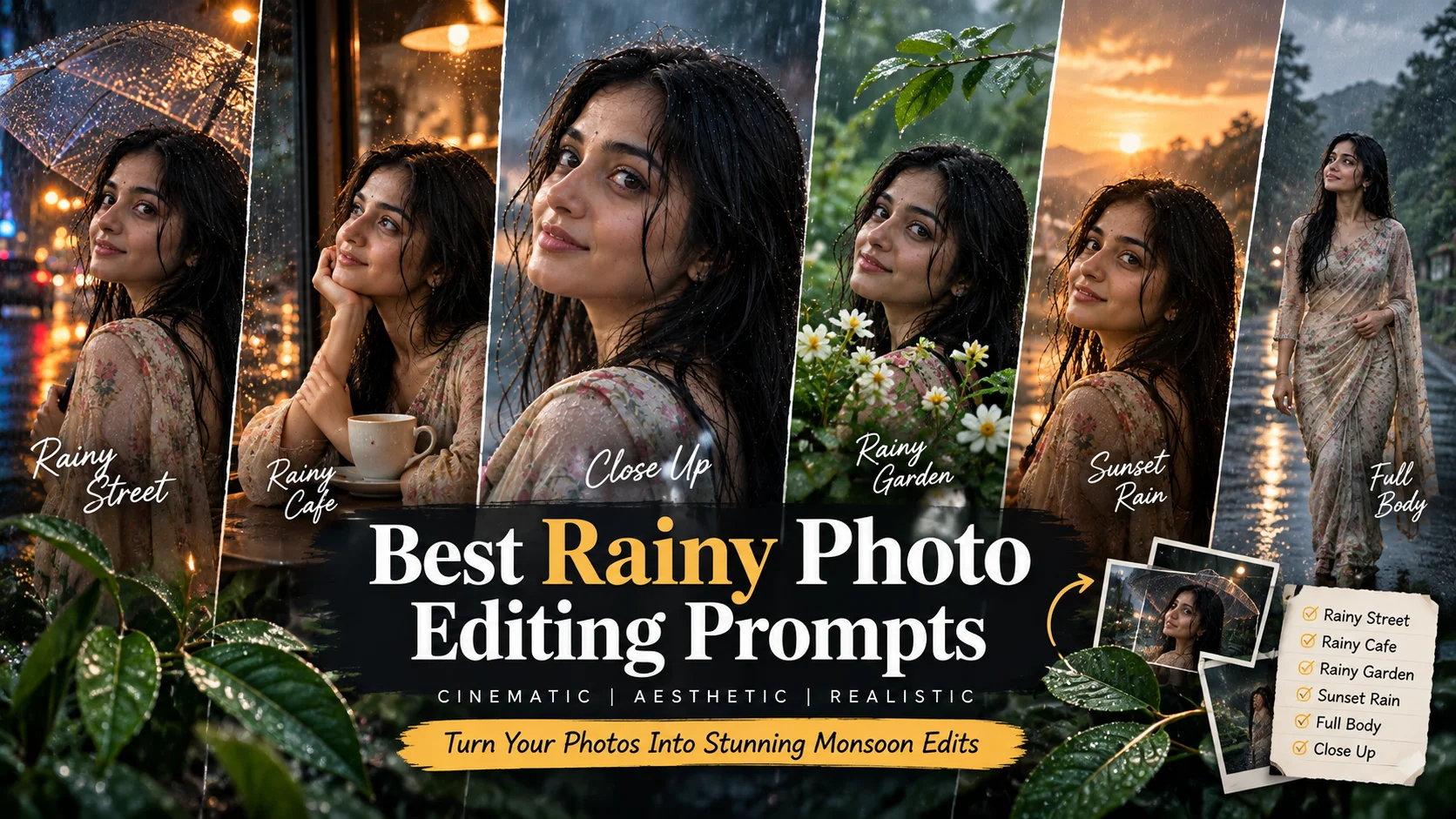
Rainy atmosphere photo editing prompts are used to create emotional, cinematic and realistic rain portraits from a normal photo. This style usually includes monsoon clouds, wet streets, umbrellas, raindrops, reflections, soft light, dramatic shadows and a movie-like mood.
These prompts are useful for Instagram photos, profile pictures, reel covers, rainy day edits, monsoon portraits and aesthetic wallpapers. You can use them in AI image editing tools such as ChatGPT image editing, Gemini or other tools that support photo-based image generation.
For best results, upload a clear portrait photo first. A front-facing or half-body image works better than a blurry selfie. Rain effects can easily hide face details, so always keep the subject visible and sharp.
Best Rainy Atmosphere AI Photo Editing Prompts
1. Cinematic Monsoon Portrait
Best for: Soft emotional rainy portrait

Prompt:
Create a realistic cinematic rainy atmosphere portrait of the girl from the reference photo standing outdoors during a gentle monsoon rain. Add soft raindrops in the air, wet hair details, natural skin texture, expressive eyes, cloudy sky, blurred green background, realistic wet ground reflections and emotional movie-style lighting. Keep the face clear and natural, with a calm expression and elegant outfit. Use shallow depth of field, soft contrast and premium cinematic color grading. Avoid plastic skin, face distortion, extra fingers, fake rain, text, logo or watermark.
Recommended aspect ratio: 4:5
Customizable elements: Outfit color, rain intensity, background, expression
Test status: Not yet model-tested
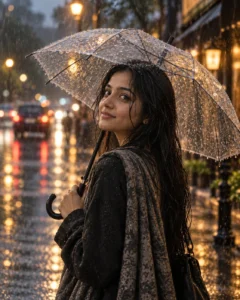
2. Transparent Umbrella Rain Portrait
Best for: Instagram post or profile photo
Prompt:
Edit the uploaded photo into a cinematic rainy portrait of a girl holding a transparent umbrella on a wet street. Add soft raindrops on the umbrella, glowing city lights in the background, realistic reflections on the road, natural facial details, smooth but realistic skin texture, slightly wet hair and an elegant rainy-day outfit. Use a professional DSLR portrait style with soft bokeh and emotional monsoon atmosphere. Keep the face sharp and natural. Avoid distorted hands, unrealistic umbrella shape, over-smoothed skin, unreadable text, logos and watermark.
Recommended aspect ratio: 4:5
Customizable elements: Umbrella color, street background, outfit style, light color
Test status: Not yet model-tested
3. Rainy Cafe Window Portrait
Best for: Cozy, emotional aesthetic photo

Prompt:
Create a cinematic rainy cafe portrait using the reference photo. Place the girl sitting near a cafe window with raindrops on the glass, warm indoor lights, wet street reflections outside, soft background blur, a cup on the table, natural skin texture, detailed eyes and a calm thoughtful expression. Add realistic window condensation, muted film colors, cozy shadows and a soft editorial photography look. The image should feel warm, rainy and realistic, not cartoonish. Avoid changing the face too much, fake glass reflections, distorted hands, extra fingers, text and watermark.
Recommended aspect ratio: 4:5
Customizable elements: Cafe mood, cup, outfit, window angle
Test status: Not yet model-tested
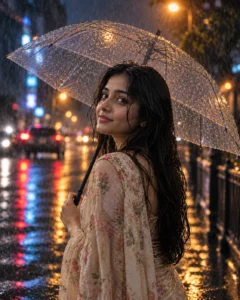
4. Rainy Night Street Portrait
Best for: Dark cinematic social media look
Prompt:
Transform the uploaded photo into a realistic rainy night street portrait. Show the girl standing on a wet city road at night with blue and orange street lights, soft neon bokeh, rain droplets in the air, wet road reflections and a confident cinematic pose. Keep her face visible, natural and sharp, with realistic skin texture, subtle makeup, slightly wet hair and a stylish dark outfit. Use dramatic low-light photography, shallow depth of field and film-style color grading. Avoid cyberpunk overload, distorted face, extra limbs, unrealistic rain, text or watermark.
Recommended aspect ratio: 4:5 or 9:16
Customizable elements: Neon color, outfit, rain intensity, pose
Test status: Not yet model-tested
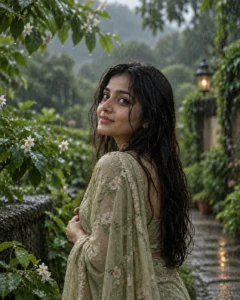
5. Rainy Garden Portrait
Best for: Soft nature-based rain edit
Prompt:
Create a cinematic rainy garden portrait of the girl from the reference photo standing among fresh green plants after rainfall. Add light rain, wet leaves, small water droplets on flowers, soft cloudy daylight, natural facial details, realistic skin texture, elegant outfit and calm expression. The background should be softly blurred with fresh monsoon atmosphere and natural colors. Keep the subject sharp and realistic. Avoid artificial flowers, excessive skin smoothing, face changes, distorted hands, text, logo or watermark.
Recommended aspect ratio: 4:5
Customizable elements: Flower type, dress color, rain level, background greenery
Test status: Not yet model-tested
6. Sunset Rain Portrait
Best for: Warm emotional cinematic edit

Prompt:
Edit the uploaded image into a cinematic sunset rain portrait. Place the girl outdoors during light rain with warm golden sunset light behind her, soft raindrops glowing in the air, wet hair strands, natural skin texture, emotional expression and realistic background blur. Add warm highlights, gentle shadows, wet ground reflections and a dreamy film-photo atmosphere. Keep the face clear and natural while preserving realistic proportions. Avoid overexposure, fake rain effects, plastic skin, extra fingers, text and watermark.
Recommended aspect ratio: 4:5
Customizable elements: Sunset color, outfit, pose, background location
Test status: Not yet model-tested
7. Rainy Road Walking Portrait
Best for: Full-body cinematic edit

Prompt:
Create a realistic full-body cinematic portrait of the girl walking on an empty rainy road. Add soft rain, cloudy sky, wet road reflections, natural walking pose, elegant outfit, realistic shadows, detailed facial features and soft wind movement in the hair. Use a professional fashion photography look with natural colors, shallow background blur and emotional monsoon atmosphere. Keep body proportions realistic and avoid exaggerated beauty filters. No distorted feet, no extra limbs, no fake road signs, no text and no watermark.
Recommended aspect ratio: 9:16
Customizable elements: Road type, outfit, walking pose, sky mood
Test status: Not yet model-tested
8. Close-Up Rain Face Portrait
Best for: Profile picture or wallpaper
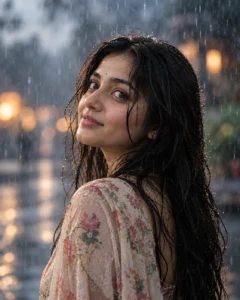
Prompt:
Create a close-up cinematic rain portrait of the girl from the reference photo. Keep her face sharp with detailed eyes, natural lips, realistic skin texture and a calm emotional expression. Add soft raindrops on hair and shoulders, blurred rainy background, cool blue-gray tones, gentle light on the face and subtle film grain. The image should look like a professional close-up portrait captured during light rain. Avoid changing the face too much, over-smoothing, fake water drops, distorted eyes, text and watermark.
Recommended aspect ratio: 1:1 or 4:5
Customizable elements: Face angle, rain drops, background blur, color tone
Test status: Not yet model-tested
How to Use These Rainy Prompts
- Upload a clear photo first.
- Copy one rainy atmosphere prompt from this article.
- Paste it into your AI image editing tool.
- If the face changes too much, ask the tool to keep the facial structure closer to the uploaded photo.
- If the rain looks fake, ask for “realistic rain particles, natural wet surfaces and correct reflections.”
- Check the final image for hands, eyes, umbrella shape, background signs and water reflections before publishing.
Customization Tips
For a romantic rainy look, use warm lights, umbrella, soft smile and wet street reflections.
For a dark cinematic look, use rainy night street, neon bokeh, blue-orange lighting and a black outfit.
For a soft natural look, use rainy garden, cloudy daylight, wet leaves and minimal makeup.
For wallpaper style, use close-up framing, blurred background and visible raindrops near the face.
Common Problems and Fixes
If the photo becomes too dark, add: “balanced exposure, visible face, soft light on the subject.”
If the face looks different, add: “keep facial features natural and close to the uploaded reference photo.”
If rain looks unrealistic, add: “natural rain direction, realistic water droplets and correct wet reflections.”
If hands look distorted, use prompts where hands are hidden or outside the frame.
If the image looks too artificial, add: “realistic photography, natural skin texture, no CGI, no cartoon effect.”
Frequently Asked Questions
What are rainy atmosphere photo editing prompts?
They are copy-paste AI instructions that help create rainy portraits with rain, wet streets, umbrellas, reflections, cloudy skies and cinematic mood.
Can I use these prompts in ChatGPT?
Yes, you can use them in ChatGPT image editing if your account supports image generation or image editing.
Are these prompts only for girls?
This article is written for girls portrait edits, but you can adjust the wording for boys, couples or general portraits.
Which prompt is best for Instagram?
The transparent umbrella prompt and rainy night street prompt are best for Instagram-style cinematic portraits.
Why does AI sometimes change the face?
AI tools can reinterpret facial details while generating rain, lighting and background changes. A clear reference photo can improve consistency, but exact matching is not guaranteed.
Are these prompts tested?
These prompts are not yet model-tested. Results can vary depending on the tool, uploaded image quality, model version and editing settings.
Final Words
Rainy atmosphere prompts are best when you want an emotional, cinematic and realistic monsoon-style photo edit. Start with the transparent umbrella prompt for a clean Instagram look, or use the rainy night street prompt if you want a darker movie-style portrait.
For more similar content, explore the Girls AI Prompts category on Prompt Seen.
